<?xml version="1.0" encoding="utf-8"?>
<feed xmlns="http://www.w3.org/2005/Atom">
  <title>They Call Me Mister James</title>
  <icon>https://www.gravatar.com/avatar/1ac8c631c34a86ddcfb6ae67f6a7a551</icon>
  <subtitle>Building the Web and Other Musings</subtitle>
  <link href="/atom.xml" rel="self"/>
  
  <link href="http://jameschambers.com/"/>
  <updated>2020-11-29T15:24:14.831Z</updated>
  <id>http://jameschambers.com/</id>
  
  <author>
    <name>James Chambers</name>
    <email>james@jameschambers.com</email>
  </author>
  
  <generator uri="http://hexo.io/">Hexo</generator>
  
  <entry>
    <title>Processing Google reCaptcha Tokens in ASP.NET Core</title>
    <link href="http://jameschambers.com/2020/11/Processing-Google-reCaptcha-Tokens-in-ASP-NET-Core/"/>
    <id>http://jameschambers.com/2020/11/Processing-Google-reCaptcha-Tokens-in-ASP-NET-Core/</id>
    <published>2020-11-29T14:26:04.000Z</published>
    <updated>2020-11-29T15:24:14.831Z</updated>
    
    <content type="html"><![CDATA[<p>Integrating a simple test to help prevent malignant input on your site is as simple as integrating a few lines of code into your website.</p><p>Now, if I could I’d pinch myself to make sure I’m not a robot, but I know very well that if I’m smart enough to think of that, they must have also programmed a sense of touch and pain into me as well. So testing to see if a website user is going to be even more daunting, because we can’t even pinch <em>them</em>. </p><p>Thankfully, the <a href="https://www.google.com/recaptcha/about/" target="_blank" rel="noopener">reCaptcha service</a> offered by Google is free add-on to your site that will help to avoid bad data getting into your site, prevent malicious users from gaining access to your resources, and helping you to avoid unwanted side effects of bots that pile up junk data through your forms.</p><p>Read on to see how to get this all wired up in a Razor Pages application in ASP.NET Core. Heck, if you are in an MVC app or are building a Web API (or Azure Function) this would all still serve useful!</p><a id="more"></a><h2 id="The-Way-it-Works"><a href="#The-Way-it-Works" class="headerlink" title="The Way it Works"></a>The Way it Works</h2><p>Here’s how it works: actually, we don’t know. Google holds their cards pretty close. The thing is, the more anyone knows about the service, the easier it is for the bad peeps to figure out a way to bypass it. So, as far as the actual “non-robot” side of things goes, we’re going to leave that part to the perfectly capable engineers at Google.</p><p><strong>However</strong>, we can certainly use the service without having to know it’s technical innards. The important part is that some client side code will help us to generate a token through the reCaptcha service using a client secret that is only valid for the domains we specify. Then, we can  use that token to verify that it was approved by reCaptcha on our server with a different, private key, that we and only we know and can use to validate the token.</p><p>And those are the key principles: a client-side token and a back-end verification of said token.</p><h2 id="How-to-Use-It"><a href="#How-to-Use-It" class="headerlink" title="How to Use It"></a>How to Use It</h2><p>First, pop over to <a href="https://www.google.com/recaptcha/about/" target="_blank" rel="noopener">reCaptcha</a>, sign in and go to the Admin Console. From there you can create or manage sites. I chose the “invisible” implementation because it’s fairly non-invasive but it is still able to provide a great level of protection to my site.</p><p>There are actually pretty good docs once you generate your keys, namely:</p><ul><li><a href="https://developers.google.com/recaptcha/docs/invisible" target="_blank" rel="noopener">Client Side Integration</a></li><li><a href="https://developers.google.com/recaptcha/docs/verify" target="_blank" rel="noopener">Server Side Integration</a></li></ul><p>But those docs are implementation agnostic, so we’ll have a look at how to get things going in a Razor Pages application. What we need to do in the Razor Pages and ASP.NET space is something like this:</p><ol><li>Add user secrets</li><li>Create a service that can be injected into our view</li><li>Update our startup to read the config and use the service</li><li>Update our view to include the script and configuration</li><li>Update our page code to setup the client key as well as to process the token</li></ol><h3 id="Add-User-Secrets-and-Update-Application-Config"><a href="#Add-User-Secrets-and-Update-Application-Config" class="headerlink" title="Add User Secrets and Update Application Config"></a>Add User Secrets and Update Application Config</h3><p>We don’t want to put our secrets into source control lest the directory be public or otherwise exposed. I like to create a placeholder in my <code>appsettings.json</code> file for the data like so:</p><figure class="highlight plain"><table><tr><td class="gutter"><pre><span class="line">1</span><br><span class="line">2</span><br><span class="line">3</span><br><span class="line">4</span><br></pre></td><td class="code"><pre><span class="line">&quot;Captcha&quot;: &#123;</span><br><span class="line">  &quot;ClientKey&quot;: &quot;&quot;,</span><br><span class="line">  &quot;ServerKey&quot;: &quot;&quot;</span><br><span class="line">&#125;</span><br></pre></td></tr></table></figure><p>Now, whenever someone on my team (or me, on a different computer) pulls down the source code it’s easy to copy and paste the configuration section into my user secrets, which are never added to the repo.</p><p>Now, right-click on your project in Visual Studio and choose “Manage User Secrets”, then copy and paste the above into the root of the JSON document. Fill in the keys with the secrets from your Google configuration. </p><p>It’s also a good idea at this time to update your staging and production environments, or any build automation steps or key stores where you would need these settings. Remember that the end result is a key-value pair, so the JSON nesting should be removed before you set a key somewhere and the key should be the composite of all property names in the path assembled with colon. What I mean by that is that our settings above will be <code>Captcha:ClientKey</code> and <code>Captcha:ServerKey</code> when you add them to your other environments. </p><p>The second side of the configuration is the ability to work with the data in a POCO. We create a class for this so that we can take advantage of the <a href="https://docs.microsoft.com/en-us/aspnet/core/fundamentals/configuration/options?view=aspnetcore-5.0" target="_blank" rel="noopener">options pattern</a>. The class looks like this:</p><figure class="highlight plain"><table><tr><td class="gutter"><pre><span class="line">1</span><br><span class="line">2</span><br><span class="line">3</span><br><span class="line">4</span><br><span class="line">5</span><br></pre></td><td class="code"><pre><span class="line">public class CaptchaSettings</span><br><span class="line">&#123;</span><br><span class="line">    public string ClientKey &#123; get; set; &#125;</span><br><span class="line">    public string ServerKey &#123; get; set; &#125;</span><br><span class="line">&#125;</span><br></pre></td></tr></table></figure><p>Two simple properties in a class. Easy-peasy.</p><h3 id="A-CaptchaVerificationService-Service"><a href="#A-CaptchaVerificationService-Service" class="headerlink" title="A CaptchaVerificationService Service"></a>A <code>CaptchaVerificationService</code> Service</h3><p>Here is the complete listing of the service I’ve created to handle the verifications. I have chosen to have a <code>false</code> result by default in the event of a service verification failure or other communication exception, but you can choose a default that best suits your needs.</p><figure class="highlight plain"><table><tr><td class="gutter"><pre><span class="line">1</span><br><span class="line">2</span><br><span class="line">3</span><br><span class="line">4</span><br><span class="line">5</span><br><span class="line">6</span><br><span class="line">7</span><br><span class="line">8</span><br><span class="line">9</span><br><span class="line">10</span><br><span class="line">11</span><br><span class="line">12</span><br><span class="line">13</span><br><span class="line">14</span><br><span class="line">15</span><br><span class="line">16</span><br><span class="line">17</span><br><span class="line">18</span><br><span class="line">19</span><br><span class="line">20</span><br><span class="line">21</span><br><span class="line">22</span><br><span class="line">23</span><br><span class="line">24</span><br><span class="line">25</span><br><span class="line">26</span><br><span class="line">27</span><br><span class="line">28</span><br><span class="line">29</span><br><span class="line">30</span><br><span class="line">31</span><br><span class="line">32</span><br><span class="line">33</span><br><span class="line">34</span><br><span class="line">35</span><br><span class="line">36</span><br><span class="line">37</span><br><span class="line">38</span><br></pre></td><td class="code"><pre><span class="line">public class CaptchaVerificationService</span><br><span class="line">&#123;</span><br><span class="line">    private CaptchaSettings captchaSettings;</span><br><span class="line">    private ILogger&lt;CaptchaVerificationService&gt; logger;</span><br><span class="line"></span><br><span class="line">    public string ClientKey =&gt; captchaSettings.ClientKey;</span><br><span class="line"></span><br><span class="line">    public CaptchaVerificationService(IOptions&lt;CaptchaSettings&gt; captchaSettings, ILogger&lt;CaptchaVerificationService&gt; logger)</span><br><span class="line">    &#123;</span><br><span class="line">        this.captchaSettings = captchaSettings.Value;</span><br><span class="line">        this.logger = logger;</span><br><span class="line">    &#125;</span><br><span class="line"></span><br><span class="line">    public async Task&lt;bool&gt; IsCaptchaValid(string token)</span><br><span class="line">    &#123;</span><br><span class="line">        var result = false;</span><br><span class="line"></span><br><span class="line">        var googleVerificationUrl = &quot;https://www.google.com/recaptcha/api/siteverify&quot;;</span><br><span class="line"></span><br><span class="line">        try</span><br><span class="line">        &#123;</span><br><span class="line">            using var client = new HttpClient();</span><br><span class="line"></span><br><span class="line">            var response = await client.PostAsync($&quot;&#123;googleVerificationUrl&#125;?secret=&#123;captchaSettings.ServerKey&#125;&amp;response=&#123;token&#125;&quot;, null);</span><br><span class="line">            var jsonString = await response.Content.ReadAsStringAsync();</span><br><span class="line">            var captchaVerfication = JsonConvert.DeserializeObject&lt;CaptchaVerificationResponse&gt;(jsonString);</span><br><span class="line"></span><br><span class="line">            result = captchaVerfication.success;</span><br><span class="line">        &#125;</span><br><span class="line">        catch (Exception e)</span><br><span class="line">        &#123;</span><br><span class="line">            // fail gracefully, but log</span><br><span class="line">            logger.LogError(&quot;Failed to process captcha validation&quot;, e);</span><br><span class="line">        &#125;</span><br><span class="line"></span><br><span class="line">        return result;</span><br><span class="line">    &#125;</span><br><span class="line">&#125;</span><br></pre></td></tr></table></figure><h3 id="Wiring-up-the-Configuration-and-Services"><a href="#Wiring-up-the-Configuration-and-Services" class="headerlink" title="Wiring up the Configuration and Services"></a>Wiring up the Configuration and Services</h3><p>Next up, head over to your <code>Startup</code> class and pop into your <code>ConfigureServices</code> method to add these two lines:</p><figure class="highlight plain"><table><tr><td class="gutter"><pre><span class="line">1</span><br><span class="line">2</span><br></pre></td><td class="code"><pre><span class="line">services.AddOptions&lt;CaptchaSettings&gt;().BindConfiguration(&quot;Captcha&quot;);</span><br><span class="line">services.AddTransient&lt;CaptchaVerificationService&gt;();</span><br></pre></td></tr></table></figure><p>The first line pulls the configuration from your key store, configuration file or user secrets, depending on your environment. The second just makes our little verification class available for dependency injection.</p><h3 id="Add-Assets-and-Configuration-to-our-View"><a href="#Add-Assets-and-Configuration-to-our-View" class="headerlink" title="Add Assets and Configuration to our View"></a>Add Assets and Configuration to our View</h3><p>Our view will have to be updated to integrate some code from the sample on the reCaptcha site. We’ll include the script from Google, and add a callback that submits our form. This code is in my <code>cshtml</code> view containing a form where I want the captcha to appear.</p><figure class="highlight plain"><table><tr><td class="gutter"><pre><span class="line">1</span><br><span class="line">2</span><br><span class="line">3</span><br><span class="line">4</span><br><span class="line">5</span><br><span class="line">6</span><br></pre></td><td class="code"><pre><span class="line">&lt;script src=&quot;https://www.google.com/recaptcha/api.js&quot; async defer&gt;&lt;/script&gt;</span><br><span class="line">&lt;script&gt;</span><br><span class="line">       function onSubmit(token) &#123;</span><br><span class="line">           document.getElementById(&quot;email-form&quot;).submit();</span><br><span class="line">       &#125;</span><br><span class="line">&lt;/script&gt;</span><br></pre></td></tr></table></figure><p>Next, we update the submit button in the view to include a few properties that help the script understand what kind of captcha we’re generating and to specify the callback.</p><figure class="highlight plain"><table><tr><td class="gutter"><pre><span class="line">1</span><br></pre></td><td class="code"><pre><span class="line">&lt;button class=&quot;g-recaptcha&quot; data-sitekey=&quot;@Model.CaptchaClientKey&quot; data-callback=&apos;onSubmit&apos;&gt;Keep me posted!&lt;/button&gt;</span><br></pre></td></tr></table></figure><p>You’ll notice in there the client key…this is why we took advantage of the <code>IOptions</code> bits and exposed it through the service. It’s part of the page model for simplicity, and we just load it up on the <code>get</code> request in the next step.</p><h3 id="Checking-the-Final-Boxes"><a href="#Checking-the-Final-Boxes" class="headerlink" title="Checking the Final Boxes"></a>Checking the Final Boxes</h3><p>That was a captcha pun, in case you missed it.</p><p>Anyway, the last step is to add a bit of code to our page’s <code>.cs</code> file. Let’s start with the class-level field for the service reference and the property we expose through our page model.</p><figure class="highlight plain"><table><tr><td class="gutter"><pre><span class="line">1</span><br><span class="line">2</span><br></pre></td><td class="code"><pre><span class="line">private readonly CaptchaVerificationService verificationService;</span><br><span class="line">public string CaptchaClientKey &#123; get; set; &#125;</span><br></pre></td></tr></table></figure><p>As well we’re going to need to capture the token from our form on the way back from the view to the server. The field is named in a non-CLR way, so we use the <code>Name</code> property on our binding to tie it to the way Google names the token in the client script.</p><figure class="highlight plain"><table><tr><td class="gutter"><pre><span class="line">1</span><br><span class="line">2</span><br></pre></td><td class="code"><pre><span class="line">[BindProperty(Name = &quot;g-recaptcha-response&quot;)]</span><br><span class="line">public string CaptchaResponse &#123;get;set;&#125;</span><br></pre></td></tr></table></figure><p>Our constructor also needs some massaging. My page is called <code>Index</code> so appropriately my class is called <code>IndexModel</code>. </p><figure class="highlight plain"><table><tr><td class="gutter"><pre><span class="line">1</span><br><span class="line">2</span><br><span class="line">3</span><br><span class="line">4</span><br></pre></td><td class="code"><pre><span class="line">public IndexModel(CaptchaVerificationService verificationService)</span><br><span class="line">    &#123;</span><br><span class="line">        this.verificationService = verificationService;</span><br><span class="line">    &#125;</span><br></pre></td></tr></table></figure><p>And, finally, our <code>OnPost</code> method needs to include the service check before proceeding with any data processing.</p><figure class="highlight plain"><table><tr><td class="gutter"><pre><span class="line">1</span><br><span class="line">2</span><br><span class="line">3</span><br><span class="line">4</span><br><span class="line">5</span><br><span class="line">6</span><br><span class="line">7</span><br><span class="line">8</span><br><span class="line">9</span><br><span class="line">10</span><br></pre></td><td class="code"><pre><span class="line">public async Task OnPost()</span><br><span class="line">&#123;</span><br><span class="line">    // validate input</span><br><span class="line">    var requestIsValid = await this.verificationService.IsCaptchaValid(CaptchaResponse);</span><br><span class="line"></span><br><span class="line">    if (requestIsValid)</span><br><span class="line">    &#123;</span><br><span class="line">        // do your processing...</span><br><span class="line">    &#125;</span><br><span class="line">&#125;</span><br></pre></td></tr></table></figure><h2 id="Ship-it"><a href="#Ship-it" class="headerlink" title="Ship it!"></a>Ship it!</h2><p>Stitching together all of the parts takes a bit of work on the first pass, but once the config and service are in place, it literally only takes a couple of minutes to wire up your views (pages, controllers, etc.). reCaptcha is a pretty slick addition to your site that can help prevent script kiddies, bots and purveyors of evil from fluffing with your data. Because no one likes getting their data fluffed.</p><p>Happy coding!</p>]]></content>
    
    <summary type="html">
    
      &lt;p&gt;Integrating a simple test to help prevent malignant input on your site is as simple as integrating a few lines of code into your website.&lt;/p&gt;
&lt;p&gt;Now, if I could I’d pinch myself to make sure I’m not a robot, but I know very well that if I’m smart enough to think of that, they must have also programmed a sense of touch and pain into me as well. So testing to see if a website user is going to be even more daunting, because we can’t even pinch &lt;em&gt;them&lt;/em&gt;. &lt;/p&gt;
&lt;p&gt;Thankfully, the &lt;a href=&quot;https://www.google.com/recaptcha/about/&quot; target=&quot;_blank&quot; rel=&quot;noopener&quot;&gt;reCaptcha service&lt;/a&gt; offered by Google is free add-on to your site that will help to avoid bad data getting into your site, prevent malicious users from gaining access to your resources, and helping you to avoid unwanted side effects of bots that pile up junk data through your forms.&lt;/p&gt;
&lt;p&gt;Read on to see how to get this all wired up in a Razor Pages application in ASP.NET Core. Heck, if you are in an MVC app or are building a Web API (or Azure Function) this would all still serve useful!&lt;/p&gt;
    
    </summary>
    
      <category term="Development" scheme="http://jameschambers.com/categories/Development/"/>
    
      <category term="Monsters Weekly" scheme="http://jameschambers.com/categories/Development/Monsters-Weekly/"/>
    
    
      <category term="ASP.NET Core" scheme="http://jameschambers.com/tags/ASP-NET-Core/"/>
    
      <category term="Web API" scheme="http://jameschambers.com/tags/Web-API/"/>
    
      <category term="Visual Studio 2019" scheme="http://jameschambers.com/tags/Visual-Studio-2019/"/>
    
      <category term="reCaptcha" scheme="http://jameschambers.com/tags/reCaptcha/"/>
    
  </entry>
  
  <entry>
    <title>No Type Was Specified for the Decimal Column</title>
    <link href="http://jameschambers.com/2019/06/No-Type-Was-Specified-for-the-Decimal-Column/"/>
    <id>http://jameschambers.com/2019/06/No-Type-Was-Specified-for-the-Decimal-Column/</id>
    <published>2019-06-21T12:19:24.000Z</published>
    <updated>2020-11-29T14:19:00.838Z</updated>
    
    <content type="html"><![CDATA[<p>When you create an entity for a database context in Entity Framework that has a <code>decimal</code> column, you may run into problems with truncation happening silently to you behind the scenes. With a default precision of 18 digits and 2 decimal places you may lose some data and the framework/runtime won’t complain about it when you do.</p><p>You can fix that though data annotations or with an explicit wire-up in your database context. Let’s look at how that’s done.</p><a id="more"></a><p>Let’s say you create an entity type that looks something like the following:</p><figure class="highlight plain"><table><tr><td class="gutter"><pre><span class="line">1</span><br><span class="line">2</span><br><span class="line">3</span><br><span class="line">4</span><br><span class="line">5</span><br><span class="line">6</span><br></pre></td><td class="code"><pre><span class="line">public class Part</span><br><span class="line">&#123;</span><br><span class="line">    public Guid PartId &#123; get; set; &#125;</span><br><span class="line">    public string Number &#123; get; set; &#125;</span><br><span class="line">    public decimal Size &#123; get; set; &#125;</span><br><span class="line">&#125;</span><br></pre></td></tr></table></figure><p>If you’re dealing with dollars and cents, an underlaying field that records to the penny may be enough. In other scenarios you may be looking for more precision than 1/100. When you attempt to create a migration for the entity based on the class above, you’ll get a warning that looks like this:</p><blockquote><p>No type was specified for the decimal column ‘Size’ on entity type ‘Part’. This will cause values to be silently truncated if they do not fit in the default precision and scale. Explicitly specify the SQL server column type that can accommodate all the values using ‘HasColumnType()’.</p></blockquote><h3 id="Using-Data-Annotations"><a href="#Using-Data-Annotations" class="headerlink" title="Using Data Annotations"></a>Using Data Annotations</h3><p>I find that most projects I’m on are already using data annotations. They are handy for model validation in our APIs (or UIs in ASP.NET) and are rather unobtrusive. They are also great at revealing rules for the underlaying data structure that we have in our project without having to dig into SQL Server. Said another way, an annotation shows a developer what the data is about and any constraints that exist in the database. They are concise and work great when the rules are straightforward.</p><p>Specifying the precision with an annotation is pretty straightforward, as is seen with <code>Part.Size</code> below.</p><figure class="highlight plain"><table><tr><td class="gutter"><pre><span class="line">1</span><br><span class="line">2</span><br><span class="line">3</span><br><span class="line">4</span><br><span class="line">5</span><br><span class="line">6</span><br><span class="line">7</span><br></pre></td><td class="code"><pre><span class="line">public class Part</span><br><span class="line">&#123;</span><br><span class="line">    public Guid PartId &#123; get; set; &#125;</span><br><span class="line">    public string Number &#123; get; set; &#125;</span><br><span class="line">    [Column(TypeName = &quot;decimal(18,4)&quot;)]</span><br><span class="line">    public decimal Size &#123; get; set; &#125;</span><br><span class="line">&#125;</span><br></pre></td></tr></table></figure><p>This will store 18 digits in the database with 4 of those after the decimal.</p><p>Intellisense will prompt you to add the <code>System.ComponentModel.DataAnnotations.Schema</code> namespace to your class if you don’t already have it.</p><h3 id="Using-the-ModelBuilder"><a href="#Using-the-ModelBuilder" class="headerlink" title="Using the ModelBuilder"></a>Using the ModelBuilder</h3><p>Your database context class can use the <code>protected override void OnModelCreating</code> method with a <code>ModelBuilder</code> parameter to futher configure your database instance (see <a href="https://docs.microsoft.com/en-us/ef/core/modeling/" target="_blank" rel="noopener">Microsoft Docs</a>). In our case, we’ll use the <code>ModelBuilder</code> to specify the type to use in SQL Server as well as the precision we wish to use.</p><figure class="highlight plain"><table><tr><td class="gutter"><pre><span class="line">1</span><br><span class="line">2</span><br><span class="line">3</span><br><span class="line">4</span><br><span class="line">5</span><br><span class="line">6</span><br><span class="line">7</span><br></pre></td><td class="code"><pre><span class="line">protected override void OnModelCreating(ModelBuilder modelBuilder)</span><br><span class="line">&#123;</span><br><span class="line">    base.OnModelCreating(modelBuilder);</span><br><span class="line">    modelBuilder.Entity&lt;Part&gt;()</span><br><span class="line">        .Property(p =&gt; p.Size)</span><br><span class="line">        .HasColumnType(&quot;decimal(18,4)&quot;);</span><br><span class="line">&#125;</span><br></pre></td></tr></table></figure><p>The <code>ModelBuilder</code> is a good option and sometimes the only option when trying to do more complicated configuration. I will sometimes add a logging statement (for the development environment) in my <code>OnModelCreating</code> in a project that also uses data annotations because it at least stands a chance of being seen by a developer in the event that unexpected behaviour is being observed. Another option would be to leave a comment on any entity that is configured via <code>OnModelCreating</code> so that you’re not leaving future versions of yourself scratching your head.</p><p>Happy coding!</p>]]></content>
    
    <summary type="html">
    
      &lt;p&gt;When you create an entity for a database context in Entity Framework that has a &lt;code&gt;decimal&lt;/code&gt; column, you may run into problems with truncation happening silently to you behind the scenes. With a default precision of 18 digits and 2 decimal places you may lose some data and the framework/runtime won’t complain about it when you do.&lt;/p&gt;
&lt;p&gt;You can fix that though data annotations or with an explicit wire-up in your database context. Let’s look at how that’s done.&lt;/p&gt;
    
    </summary>
    
      <category term="Development" scheme="http://jameschambers.com/categories/Development/"/>
    
    
      <category term="EF Core" scheme="http://jameschambers.com/tags/EF-Core/"/>
    
  </entry>
  
  <entry>
    <title>Removing Bower - The command &quot;bower install&quot; exited with code 1 When Publishing</title>
    <link href="http://jameschambers.com/2018/07/removing-bower-from-asp-net-mvc-core-applications/"/>
    <id>http://jameschambers.com/2018/07/removing-bower-from-asp-net-mvc-core-applications/</id>
    <published>2018-07-12T10:42:00.000Z</published>
    <updated>2020-11-29T14:19:00.887Z</updated>
    
    <content type="html"><![CDATA[<p>I was cleaning up and updating the JS package management in a project that has shuffled along from ASP.NET Core 1.0 (and runs on .NET 4.6) and everything seemed to be going fine. And then I tried to publish. </p><blockquote><p>Publish has encountered an error. Build failed. Check the Output window for more details.</p></blockquote><p>Upon further examination, I noticed that there was a problem with an msbuild task, namely <code>PrepublishScript</code>.</p><a id="more"></a><p>The error looked something like the following:</p><figure class="highlight plain"><table><tr><td class="gutter"><pre><span class="line">1</span><br><span class="line">2</span><br><span class="line">3</span><br><span class="line">4</span><br><span class="line">5</span><br><span class="line">6</span><br><span class="line">7</span><br><span class="line">8</span><br><span class="line">9</span><br></pre></td><td class="code"><pre><span class="line">    Target &quot;PrepublishScript&quot; in project &quot;C:\james\code\project.csproj&quot; (target &quot;PrepareForPublish&quot; depends on it):</span><br><span class="line">        Using &quot;Exec&quot; task from assembly &quot;Microsoft.Build.Tasks.Core, Version=15.1.0.0, Culture=neutral, PublicKeyToken=b03f5f7f11d50a3a&quot;.</span><br><span class="line">        Task &quot;Exec&quot;</span><br><span class="line">        Task Parameter:Command=bower install</span><br><span class="line">        Exec: bower install</span><br><span class="line">        Exec: bower                           ENOENT No bower.json present</span><br><span class="line">C:\james\code\project.csproj(98,5): Error MSB3073: The command &quot;bower install&quot; exited with code 1.</span><br><span class="line">        Done executing task &quot;Exec&quot; -- FAILED.</span><br><span class="line">        Done building target &quot;PrepublishScript&quot; in project &quot;myproject.csproj&quot; -- FAILED.</span><br></pre></td></tr></table></figure><p>This made sense; after all, I had just deleted my <code>bower.json</code> and moved package management over to npm. </p><p>To clean this up, I had to simply unload the project and edit the csproj file directly. Tracking down the <code>PrepublishScript</code> target, I was able to locate the line that was causing me grief:</p><figure class="highlight plain"><table><tr><td class="gutter"><pre><span class="line">1</span><br><span class="line">2</span><br><span class="line">3</span><br><span class="line">4</span><br></pre></td><td class="code"><pre><span class="line">&lt;Target Name=&quot;PrepublishScript&quot; BeforeTargets=&quot;PrepareForPublish&quot;&gt;</span><br><span class="line">  &lt;Exec Command=&quot;bower install&quot; /&gt;</span><br><span class="line">  &lt;Exec Command=&quot;dotnet bundle&quot; /&gt;</span><br><span class="line">&lt;/Target&gt;</span><br></pre></td></tr></table></figure><p>Removing the <code>exec</code> line for bower did the trick, and I was able to resume publishing.  </p><p>As a final step, I had to reload my project and reset my startup project configuration, which Visual Studio loses when you unload a project in the mix.</p><h2 id="Why-This-Happens"><a href="#Why-This-Happens" class="headerlink" title="Why This Happens"></a>Why This Happens</h2><p>Over time the templates for projects evolve and they may or may not leave artifcats behind, such as a build step for a now antiquated package manager.  You may see other errors such as this in your travels, especially on projects created “in transition” as ASP.NET Core came about.  Don’t be afraid to create a branch and play with that csproj file if needed when you run into these kinds of things; you can always roll back your changes or abandon the branch if things go south.</p><p>Happy coding!</p>]]></content>
    
    <summary type="html">
    
      &lt;p&gt;I was cleaning up and updating the JS package management in a project that has shuffled along from ASP.NET Core 1.0 (and runs on .NET 4.6) and everything seemed to be going fine. And then I tried to publish. &lt;/p&gt;
&lt;blockquote&gt;
&lt;p&gt;Publish has encountered an error. Build failed. Check the Output window for more details.&lt;/p&gt;
&lt;/blockquote&gt;
&lt;p&gt;Upon further examination, I noticed that there was a problem with an msbuild task, namely &lt;code&gt;PrepublishScript&lt;/code&gt;.&lt;/p&gt;
    
    </summary>
    
      <category term="Development" scheme="http://jameschambers.com/categories/Development/"/>
    
    
      <category term="ASP.NET Core" scheme="http://jameschambers.com/tags/ASP-NET-Core/"/>
    
      <category term="ASP.NET Core MVC" scheme="http://jameschambers.com/tags/ASP-NET-Core-MVC/"/>
    
      <category term="Visual Studio 2017" scheme="http://jameschambers.com/tags/Visual-Studio-2017/"/>
    
      <category term="npm" scheme="http://jameschambers.com/tags/npm/"/>
    
      <category term="bower" scheme="http://jameschambers.com/tags/bower/"/>
    
  </entry>
  
  <entry>
    <title>Choosing a Channel for the Microsoft Bot Framework</title>
    <link href="http://jameschambers.com/2018/03/bakebot/bots-day-2-choosing-a-channel/"/>
    <id>http://jameschambers.com/2018/03/bakebot/bots-day-2-choosing-a-channel/</id>
    <published>2018-03-11T02:16:13.000Z</published>
    <updated>2020-11-29T14:19:00.844Z</updated>
    
    <content type="html"><![CDATA[<p>Knowing where to tune in so that your users can more readily interface with you is a critical bot of your bot’s success. </p><p><img src="https://jcblogimages.blob.core.windows.net/img/2018/bakebot/2018-03-12-1720efd2.png" alt="Tuning into your users"></p><p>Knowing quantitatively where your users congregate (and wish to interact) is the best way to understand how you can start to piece together your bot, but you don’t have to have all the answers right away.</p><a id="more"></a><h2 id="Channels-for-Your-Bot"><a href="#Channels-for-Your-Bot" class="headerlink" title="Channels for Your Bot"></a>Channels for Your Bot</h2><p>Your users will be approaching your business from different mediums all the time. Some users might use Facebook, others Skype, others still SMS. A channel in the Microsoft Bot Framework is a funnel through which your users will communicate with your bot code.</p><p>The problem is, should you try to write a bot on your own, is that nearly every single source of user interaction out there will define its own standard for bot interaction. These are likely going to be JSON in some kind, with an end point that you can post data to and a corresponding web hook that you’ll need to write to catch responses and other input. They will require some form of identification. They will almost certainly have a custom payload that is unique to their platform, and distinct, often unique ways to render information to the end user.</p><p>The framework does a pretty good job of aggregating that data into a common set of objects that are easy to code against. This makes it a little easier to write shared services and renderers that will help you to craft a unique experience.</p><p>The currently supported channels are:</p><ul><li>Bing</li><li>Cortana</li><li>Email</li><li>Facebook</li><li>GroupMe</li><li>Microsoft Teams</li><li>Skype / Skype for Business</li><li>Telegram</li><li>Twilio</li><li>Web Chat</li></ul><p>The Direct Line protocol also allows you to create a custom client application and integrate with the Bot Framework using a fairly straightforward control in a number of different scenarios, with or without front-end frameworks like React.</p><p>Note that each channel will give you certain capabilities that may not be offered in other channels, including access to specific user data or the way that you can render output and controls to interact with your bot. You need to take these into consideration so that you can manage your output and flow appropriately on each channel.</p><h2 id="Choosing-a-Channel"><a href="#Choosing-a-Channel" class="headerlink" title="Choosing a Channel"></a>Choosing a Channel</h2><p>In conversation with other bot writers over the last little while the conversation keeps coming up around how they chose the channels they use in their bot. There is no magic recipe for which channels to use for your organization, but in my case the primary channels will be SMS and Facebook and later via our web site.  </p><p>For you, the choice will likely come down to the way your users already behave. For one colleague, this meant using Skype as an internal knowledge bot. For another, it was a combination of SMS and web. </p><p>Here’s why we chose to move ahead with our selection of SMS and Facebook:</p><ul><li>Our bot users are mostly customers. When they place orders we proactively start conversations with them. With the conversation primed and started on our end, we can know with greater certainty how to guide the user into the pit of bot success.</li><li>Some of our users initiate conversations with us by texting our company phone number. By using the SMS channel we can do a “soft” identification with the channel data, resolve the customer and give them information about upcoming orders.</li><li>Most of our communication is done with customers on Facebook. Approximately 80% of inquiries are about product information, store hours and location. As our Social Media presence grows having a bot to handle this 80% is an effective way to keep our labor costs down for questions like, “When will you have Schmoo Tortes again?” or “Do I have a pie ordered for next Thursday?” or even, “When will you be selling that bread you have with roasted potatoes and caramelized onions?”</li></ul><p>These reasons likely won’t be right for you, but it may be worth starting to record some metrics to help you make a choice. Knowing that 81.4% of conversations on Facebook were about store hours, location and product info meant that we could make a safe assumption about how to best serve our customers. </p><h2 id="Tuning-In-To-Your-Users"><a href="#Tuning-In-To-Your-Users" class="headerlink" title="Tuning In To Your Users"></a>Tuning In To Your Users</h2><p>You may find that your users have different objectives based on their channel, or perhaps the channels are so different that they can’t possibly deliver a consistant experience. This was the case with BakeBot. SMS users (plain text on phones) and Facebook (rich, visual experiences with multiple options for display in browser or in a dedicated messaging app) have very different expectations. </p><p>We decided to start those conversations off very differently, so we have multiple <code>RootDialog</code> classes that allow us to model those experience appropriate to the channel in question.  This allows me to approach the handoff to the dialog in an explicit way. While not displayed below, I also have the ability to check and act on channel-specific data (like Facebook’s “Get Started” command) which we’ll look at in a different post.</p><figure class="highlight plain"><table><tr><td class="gutter"><pre><span class="line">1</span><br><span class="line">2</span><br><span class="line">3</span><br><span class="line">4</span><br><span class="line">5</span><br><span class="line">6</span><br><span class="line">7</span><br><span class="line">8</span><br><span class="line">9</span><br><span class="line">10</span><br><span class="line">11</span><br><span class="line">12</span><br><span class="line">13</span><br><span class="line">14</span><br><span class="line">15</span><br><span class="line">16</span><br><span class="line">17</span><br><span class="line">18</span><br><span class="line">19</span><br><span class="line">20</span><br><span class="line">21</span><br><span class="line">22</span><br><span class="line">23</span><br><span class="line">24</span><br><span class="line">25</span><br><span class="line">26</span><br></pre></td><td class="code"><pre><span class="line">if (message.ChannelId == Channels.Facebook )</span><br><span class="line">&#123;</span><br><span class="line">    // do channel-specific things here...</span><br><span class="line">    </span><br><span class="line">    await Conversation.SendAsync(activity, () =&gt; new FacebookRootDialog());</span><br><span class="line">    return Request.CreateResponse(HttpStatusCode.OK);</span><br><span class="line">&#125;</span><br><span class="line"></span><br><span class="line">if (message.ChannelId == Channels.Sms)</span><br><span class="line">&#123;</span><br><span class="line">    await Conversation.SendAsync(activity, () =&gt; new SmsRootDialog());</span><br><span class="line">    return Request.CreateResponse(HttpStatusCode.OK);</span><br><span class="line">&#125;</span><br><span class="line"></span><br><span class="line">if(message.ChannelId == Channels.Emulator || message.ChannelId == Channels.WebChat)</span><br><span class="line">&#123;</span><br><span class="line">    await Conversation.SendAsync(activity, () =&gt; new GeneralRootDialog());</span><br><span class="line">    return Request.CreateResponse(HttpStatusCode.OK);</span><br><span class="line">&#125;</span><br><span class="line"></span><br><span class="line">reply.Text = &quot;Hi, I&apos;m BakeBot! I can&apos;t do much yet, but I&apos;m learning. I&apos;ll let my humans know that you tried to reach us!&quot;;</span><br><span class="line">await connector.Conversations.ReplyToActivityAsync(reply);</span><br><span class="line"></span><br><span class="line">// notify humans...</span><br><span class="line"></span><br><span class="line">return Request.CreateResponse(HttpStatusCode.OK);</span><br></pre></td></tr></table></figure><p>You’ll notice that I have a fallback to channels I’m still okay with (namely the emulator and the web chat channels) and then finally I reply with a generic message and continue on with a notification to a human.</p><h2 id="Wrapping-Up"><a href="#Wrapping-Up" class="headerlink" title="Wrapping Up"></a>Wrapping Up</h2><p>Okay, next up we’re going to hop into some bot code, so make sure you have your pre-requisites in place and get ready to start bot-making.</p><p>Happy coding!</p><p><em>This article is part of an ongoing series on the <a href="/2018/03/bakebot/bots-day-0-Building-Bots-With-Microsofts-Bot-Framework/">Microsoft Bot Framework</a></em>.</p>]]></content>
    
    <summary type="html">
    
      &lt;p&gt;Knowing where to tune in so that your users can more readily interface with you is a critical bot of your bot’s success. &lt;/p&gt;
&lt;p&gt;&lt;img src=&quot;https://jcblogimages.blob.core.windows.net/img/2018/bakebot/2018-03-12-1720efd2.png&quot; alt=&quot;Tuning into your users&quot;&gt;&lt;/p&gt;
&lt;p&gt;Knowing quantitatively where your users congregate (and wish to interact) is the best way to understand how you can start to piece together your bot, but you don’t have to have all the answers right away.&lt;/p&gt;
    
    </summary>
    
      <category term="Development" scheme="http://jameschambers.com/categories/Development/"/>
    
      <category term="Chez Angela" scheme="http://jameschambers.com/categories/Development/Chez-Angela/"/>
    
    
      <category term="Bot Framework" scheme="http://jameschambers.com/tags/Bot-Framework/"/>
    
  </entry>
  
  <entry>
    <title>BakeBot Day 1: What a Bot Is (And What It Is Not)</title>
    <link href="http://jameschambers.com/2018/03/bakebot/bots-day-1-What-a-Bot-Is/"/>
    <id>http://jameschambers.com/2018/03/bakebot/bots-day-1-What-a-Bot-Is/</id>
    <published>2018-03-09T05:12:54.000Z</published>
    <updated>2020-11-29T14:19:00.844Z</updated>
    
    <content type="html"><![CDATA[<p>One of the most important things in bot creation is understanding what a bot should actually be. The last thing we want to do is to over extend ourselves. Complexity is always the enemy when we’re working on software, and bots have a very real human component in their routing operation that makes things complex enough on their own without us adding in any extra.</p><p><img src="https://jcblogimages.blob.core.windows.net/img/2018/2018-03-11-c3bb11ff.png" alt="BakeBot at Chez Angela"></p><p>Before we dive into building a bot, let’s start by getting on the same page of understanding and filling in some background details. If nothing else, this will give you visibility into why I’ve approached things the way I have.</p><a id="more"></a><p><em>This article is part of an ongoing series on the <a href="/2018/03/bakebot/bots-day-0-Building-Bots-With-Microsofts-Bot-Framework/">Microsoft Bot Framework</a></em>.</p><h2 id="It’s-Like-They-Knew-We-Were-Coming"><a href="#It’s-Like-They-Knew-We-Were-Coming" class="headerlink" title="It’s Like They Knew We Were Coming"></a>It’s Like They Knew We Were Coming</h2><p>Over the years I’ve made several stabs at building some type of command-and-answer service. Early on I wrote text games simliar to “Mad Libs”.  I’ve written auto-responders for email clients and console applications that allow users to choose from menus. I have built context menus in WinForms applications, dropdowns on web pages and multi-view apps in mobile toolkits. I’ve written scripts that accept various commands, options and parameters that in turn pass on some type of payload to a service accross the wire. I’ve built Web APIs that accept images and endpoints that process files to produce custom HTTP response messages as required for integration.</p><p>If you’ve shared in any of these adventures, I have good news, friends: just like me, you’ve been training to write bots.</p><blockquote><p>“This is going to be awesome.” - me, giggling in the Cognitive Services AI Immersion Workshop at //Build 2017</p></blockquote><p>The further I dive into the Bot Framework and the other complimentary services to support it, the more I feel at home. The types of things I have to do to build a bot feel natural, like things that I’ve been doing for years. The SDKs are well thought out and improving. Lessons learned in other areas of SDK and API design have been applied and are evolving and being tailored to meet the specific needs of interacting with people using conversation. And the cloud enables some very interesting capabilities without the effort that would have been required just a few short years ago.</p><p>So, yeah…this is going to be awesome.</p><h2 id="So-What-the-Heck-is-a-Bot"><a href="#So-What-the-Heck-is-a-Bot" class="headerlink" title="So, What the Heck is a Bot?"></a>So, What the Heck is a Bot?</h2><p>A bot is not the arrival of sentient beings. A bot itself is not an implementation of a neural network or the birth of a T-1000.  You’ll hear repeatedly that as a bot developer, your job is not to pass the Turing test or even allow users free-form interaction.</p><p>From a technology perspective, a bot is nothing more than an API endpoint that accepts data and returns a response. The messages that are sent by, received to and proxied through the Microsoft Bot Framework are JSON, which makes them human-readable and easy to log and debug.  </p><p>From the view of a delivered product, a bot puts some tools in place to allow your customers or staff to access business intelligence or issue commands relevant to your business’ needs.  It will interpret what the user is saying, look data up in your data stores, make decisions through logic you create, perform tasks on behalf of your users or the system and ultimately help a user accomplish a task.</p><p>You will be responsible for hosting the bot in some way. Because it’s just a service that you likely already understand, you can stuff it on an existing web server or ship it out to the cloud. And because bots can leverage other cloud and programming features you’ll find that you’re already well-equipped with an arsenal that will help you build some pretty powerful experiences.</p><h2 id="The-Microsoft-Bot-Framework-As-Described-by-a-Simpleton"><a href="#The-Microsoft-Bot-Framework-As-Described-by-a-Simpleton" class="headerlink" title="The Microsoft Bot Framework, As Described by a Simpleton"></a>The Microsoft Bot Framework, As Described by a Simpleton</h2><p>I am not going to go too deep into the tech here. There are some great resources out there that do so, but the important bits for a developer are what I refer to as the “lifecycles” of the elements of which the bots are composed.  There are also many ways to build and host bots, so I’ll assume you’re going to go with the Visual Studio experience, with configuration and deployment destined for Azure. As a ‘dotnet’ developer I am also going to focus my efforts in the c# domain, though there are kits available for other languages including node and Java.</p><p>A bot is typically composed of:</p><ul><li>Some sort of UI</li><li>A channel that allows communication between the user and the bot</li><li>An API that you host that is configured as the endpoint for a channel</li><li>A JSON payload with user input, payload and channel-specific information</li><li>System messages that help you control flow</li><li>State to help you manage conversation</li><li>The Bot Framework, to help turn conversation payload into something interesting to your application code, and</li><li>Logic you write to respond to the incoming messages.</li></ul><p>The entry point for any bot is the user interface (there is an exception to this which we’ll cover in detail, but lets start here). The UI is something that you can write yourself (such as your web page) but it is just as likely or more so that your user will come in though UI that you didn’t write. These are called channels and they exist in the form of Facebook Messenger, SMS, Skype and so forth. And herein lies the biggest value proposition of the Bot Framework: the abstraction over those channels.</p><p>User interaction is configured for each channel in the Azure portal. You will need to register your application with each of the respective third parties (such as creating an application in Facebook) and then setup application IDs, webhooks or other aspects to establish channel communication. </p><p>In the context of the Microsoft Bot Framework, the bot itself is a Web API project that accepts HTTP POST requests (note that the V3 API is written on .NET full framework, whereas the upcoming V4 is written for .NET Core). </p><p>The incoming message from a channel - the user input - comes across the wire as JSON and goes through the model binding process as would any payload in your MVC or Web API project.  There are pre-defined types provided by the framework to help make this fairly painless.</p><p>In your API controller you are responsible for inspecting the type of activity that was sent from the channel and pushing the message to the appropriate code. This may mean that you’ve recieved text from a user, that someone has liked a response your bot sent, or a signal that a user has joined a conversation.</p><p>In the event of a non-system message, you’re likely going to send the activity on to the Bot Framework bits. The framework takes care of figuring out state, propagating channel-specific data to your code and helping you restore conversational state. Usually, this will mean something like passing your message through the framework to a dialog class. The purpose of each dialog is to segregate related bits of code that would help to form a user experience. The typical pattern is to create a “root” dialog from which all conversations can be managed. From the root, you guide users by using suggestions or buttons so that they can move in a direction that helps them find success. </p><p>So, this is where it gets interesting (and more than a little bit complicated).</p><ul><li>How do you manage state?</li><li>What is the “shape” of a conversation?</li><li>What happens if a user goes off script?</li></ul><p>These are just a few of many great questions you’re going to have to think through, as I’m currently doing, and hopefully I can add some insight to your thoughts along the way. (And, hey! Please add your insights along the way as well!)</p><h2 id="You-Can’t-Build-a-Perfect-Bot-So-Don’t-Try-From-the-“Personal-Experience”-files-of-James"><a href="#You-Can’t-Build-a-Perfect-Bot-So-Don’t-Try-From-the-“Personal-Experience”-files-of-James" class="headerlink" title="You Can’t Build a Perfect Bot, So Don’t Try (From the “Personal Experience” files of James)"></a>You Can’t Build a Perfect Bot, So Don’t Try (From the “Personal Experience” files of James)</h2><p>While your job is to create an experience (dialog) or set of experiences (dialogs) that will help the user get at what they need to, some users are hell bent on failure. Well, at least that’s what it looks like when you’re reviewing the logs.</p><blockquote><p>when r u open and is there chocolate pie. it’s for Wedsnday. it’s my aunts birthday and i haven’t seen her in a long time and I think she likes it. or we could have a cake if you have some  - Actual Facebook user message</p></blockquote><p>In an upcoming post I’ll share a lot more on this, but just know that you can’t solve for “user” quite yet. It really comes down to making sure you guide the user, and we’ll look at that in greater detail as we go.</p><h2 id="Getting-Into-the-Bits"><a href="#Getting-Into-the-Bits" class="headerlink" title="Getting Into the Bits"></a>Getting Into the Bits</h2><p>As a primer, you’re likely going to need to install a few things or at least update some bits on your machine. Here’s some links that will help to get you started:</p><ul><li><a href="https://portal.azure.com" target="_blank" rel="noopener">Microsoft Azure</a> - Create an account</li><li><a href="https://dev.botframework.com/bots" target="_blank" rel="noopener">Microsoft Bot Framework</a> - Create a bot </li><li><a href="https://www.visualstudio.com/downloads/" target="_blank" rel="noopener">Visual Studio 2017</a> - Get a good editor</li><li><a href="https://docs.microsoft.com/en-us/bot-framework/dotnet/bot-builder-dotnet-quickstart" target="_blank" rel="noopener">Bot Project Templates</a> - Get the code gen bits</li></ul><p>Okay…I’ll try to keep this content coming as fast I work through it. Feel free to give any feedback you have along the way as we learn together.</p><p>Happy coding!</p><p><em>This article is part of an ongoing series on the <a href="/2018/03/bakebot/bots-day-0-Building-Bots-With-Microsofts-Bot-Framework/">Microsoft Bot Framework</a></em>.</p>]]></content>
    
    <summary type="html">
    
      &lt;p&gt;One of the most important things in bot creation is understanding what a bot should actually be. The last thing we want to do is to over extend ourselves. Complexity is always the enemy when we’re working on software, and bots have a very real human component in their routing operation that makes things complex enough on their own without us adding in any extra.&lt;/p&gt;
&lt;p&gt;&lt;img src=&quot;https://jcblogimages.blob.core.windows.net/img/2018/2018-03-11-c3bb11ff.png&quot; alt=&quot;BakeBot at Chez Angela&quot;&gt;&lt;/p&gt;
&lt;p&gt;Before we dive into building a bot, let’s start by getting on the same page of understanding and filling in some background details. If nothing else, this will give you visibility into why I’ve approached things the way I have.&lt;/p&gt;
    
    </summary>
    
      <category term="Development" scheme="http://jameschambers.com/categories/Development/"/>
    
      <category term="Chez Angela" scheme="http://jameschambers.com/categories/Development/Chez-Angela/"/>
    
    
      <category term="Bot Framework" scheme="http://jameschambers.com/tags/Bot-Framework/"/>
    
  </entry>
  
  <entry>
    <title>BakeBot - A Bot for our Bakery Built with the Microsoft Bot Framework</title>
    <link href="http://jameschambers.com/2018/03/bakebot/bots-day-0-Building-Bots-With-Microsofts-Bot-Framework/"/>
    <id>http://jameschambers.com/2018/03/bakebot/bots-day-0-Building-Bots-With-Microsofts-Bot-Framework/</id>
    <published>2018-03-08T01:12:54.000Z</published>
    <updated>2020-11-29T14:19:00.844Z</updated>
    
    <content type="html"><![CDATA[<p>As our small business grew we increasingly found that customers had the same types of questions over and over again. To help our bakery grow while staying engaged with social media (and to avoid significant labor costs in repetitive actions) we built a “bakery bot” or BakeBot. </p><p>In this blog series we’ll walk through the concepts, design and code required to build a bot using the Microsoft Bot Framework. We’ll leverage several Azure services to add value to the conversation with our customers by using data we’ve already got in our organization.</p><p><img src="https://jcblogimages.blob.core.windows.net/img/2018/2018-03-11-c3bb11ff.png" alt="BakeBot at Chez Angela"></p><a id="more"></a><p><em>This article is part of an ongoing series on the <a href="/2018/03/bakebot/bots-day-0-Building-Bots-With-Microsofts-Bot-Framework/">Microsoft Bot Framework</a></em>.</p><p>The ability for developers to create engaging, believable - and more importantly, useful - bots has been evolving rapidly over the last few years. Today, we have access to some incredible services and frameworks that allow us to rapidly build bots we can leverage to fill business needs.</p><p>The surface area that bots can reach has grown, too, with every major messaging platform providing integration capabilities for bot frameworks to interact with users. From Facebook to Skype to SMS and beyond, the number of users that can access your bot using paradigms they already understand is extensive and growing both locally and globally.</p><p>We’re reaching a new level of artificial pseudo-sentience where the “conversational UI” will emerge as a common pattern for customers to interact with companies, large and small alike. At Chez Angela, our bakery is using all kinds of new features of Azure to make our company successful and help our customers get at the information they need. We’re excited about what BakeBot can help us accomplish, from ordering to scheduling to answering common questions about allergies, ingredients and product availability. </p><table><thead><tr><th>Posts In This Bot Series</th></tr></thead><tbody><tr><td><a href="../../bakebot/bots-day-1-What-a-Bot-Is/">Day 1: What a Bot Is (And What It Is Not)</a></td></tr><tr><td><a href="../../bakebot/bots-day-2-choosing-a-channel">Day 2: Choosing a Channel</a></td></tr><tr><td>Next up: QnA Maker &amp; Your First Bot</td></tr></tbody></table><p>Is there a topic you’d like to see that’s not in the mix? Please leave a comment below!</p><p>Happy coding!</p>]]></content>
    
    <summary type="html">
    
      &lt;p&gt;As our small business grew we increasingly found that customers had the same types of questions over and over again. To help our bakery grow while staying engaged with social media (and to avoid significant labor costs in repetitive actions) we built a “bakery bot” or BakeBot. &lt;/p&gt;
&lt;p&gt;In this blog series we’ll walk through the concepts, design and code required to build a bot using the Microsoft Bot Framework. We’ll leverage several Azure services to add value to the conversation with our customers by using data we’ve already got in our organization.&lt;/p&gt;
&lt;p&gt;&lt;img src=&quot;https://jcblogimages.blob.core.windows.net/img/2018/2018-03-11-c3bb11ff.png&quot; alt=&quot;BakeBot at Chez Angela&quot;&gt;&lt;/p&gt;
    
    </summary>
    
      <category term="Development" scheme="http://jameschambers.com/categories/Development/"/>
    
      <category term="Chez Angela" scheme="http://jameschambers.com/categories/Development/Chez-Angela/"/>
    
    
      <category term="Bot Framework" scheme="http://jameschambers.com/tags/Bot-Framework/"/>
    
      <category term="BakeBot" scheme="http://jameschambers.com/tags/BakeBot/"/>
    
      <category term="Chez Angela" scheme="http://jameschambers.com/tags/Chez-Angela/"/>
    
  </entry>
  
  <entry>
    <title>Chez Angela: Building a Cloud-Based Bakery</title>
    <link href="http://jameschambers.com/2018/03/chez-angela/chez-angela-cloud-bakery/"/>
    <id>http://jameschambers.com/2018/03/chez-angela/chez-angela-cloud-bakery/</id>
    <published>2018-03-04T04:12:54.000Z</published>
    <updated>2020-11-29T14:19:00.850Z</updated>
    
    <content type="html"><![CDATA[<p>My wife and I are undertaking an enormous shift in our lives and entering the food service industry. My day job will continue to be consulting in the Azure, Cognitive Services and ASP.NET Core space, but I am also privileged to work side-by-side with my incredible wife as we build a bakery together.</p><p><img src="https://jcblogimages.blob.core.windows.net/img/2017/cloud-bakery-banner.png" alt="Chez Angela - Building a Cloud-Based Bakery"></p><p>My role in the bakery is largely on the technology side, and I’m building everything to do with our “bakery platform” on Azure and related technologies. My wife, of course, is the digital to analog converter. :)</p><a id="more"></a><p>This blog series will cover all the tech that I use and build on. In this post, I’m going<br>to layout the feature set for everything that I’ll be building along the way and what<br>technologies I intend (and actually) use to implement them.</p><p><em>This article is part of an ongoing series called <a href="../chez-angela-cloud-bakery/">Building a Cloud-Based Bakery</a></em>.</p><p>Over the next several months, new blog entries based on the code that helps to build out the following features will be linked below. I hope you enjoy these entries as we build our cloud-based bakery, and that they help you in your coding efforts.</p><table><thead><tr><th>Features and Services</th><th>Technologies Used</th><th>Related Posts</th></tr></thead><tbody><tr><td>Order Processing</td><td>Azure Functions, Square Payments, Azure Service Bus</td><td></td></tr><tr><td>SMS/Facebook Messenger Bot</td><td>LUIS, QnA Maker, Web API, Bot Framework</td><td></td></tr><tr><td>Automated Answers</td><td>QandA Maker, Bot Framework</td><td></td></tr><tr><td>Web Site Features</td><td>ASP.NET Core, Tag Helpers, Azure Web Apps</td><td></td></tr><tr><td>Suggesting Products</td><td>LUIS, Document DB, Bot Framework</td><td></td></tr><tr><td>Answering Questions About Product Ingredients</td><td>LUIS, EF, Azure SQL, Bot Framework</td><td></td></tr><tr><td>Communicating with Customers</td><td>ASP.NET Core, SendGrid, Twilio, Azure Functions</td><td></td></tr><tr><td>Subscription Management</td><td>.NET Core, SendGrid, EF, Square Payments</td><td></td></tr><tr><td>Product Reminders</td><td>Bot Framework, EF, Azure Functions, Service Bus</td><td></td></tr><tr><td>Protecting Data</td><td>SSL Certs, Azure Web Apps, Middleware</td><td></td></tr><tr><td>Identity and Profile</td><td>ASP.NET Core, Bot Framework</td><td></td></tr><tr><td>Protecting Application Secrets</td><td>User Secrets, Visual Studio, <code>dotnet</code>, Azure Web Apps</td><td></td></tr></tbody></table><p>The code for much of the bakery will be freely available on GitHub, though some aspects of the code will be kept private to guard the logic that helps to set us apart. When I have the codebase ready, I’ll update this post to get the code out there!</p><p>Happy Coding!</p>]]></content>
    
    <summary type="html">
    
      &lt;p&gt;My wife and I are undertaking an enormous shift in our lives and entering the food service industry. My day job will continue to be consulting in the Azure, Cognitive Services and ASP.NET Core space, but I am also privileged to work side-by-side with my incredible wife as we build a bakery together.&lt;/p&gt;
&lt;p&gt;&lt;img src=&quot;https://jcblogimages.blob.core.windows.net/img/2017/cloud-bakery-banner.png&quot; alt=&quot;Chez Angela - Building a Cloud-Based Bakery&quot;&gt;&lt;/p&gt;
&lt;p&gt;My role in the bakery is largely on the technology side, and I’m building everything to do with our “bakery platform” on Azure and related technologies. My wife, of course, is the digital to analog converter. :)&lt;/p&gt;
    
    </summary>
    
      <category term="Development" scheme="http://jameschambers.com/categories/Development/"/>
    
      <category term="Chez Angela" scheme="http://jameschambers.com/categories/Development/Chez-Angela/"/>
    
    
      <category term="Azure" scheme="http://jameschambers.com/tags/Azure/"/>
    
      <category term="ASP.NET Core" scheme="http://jameschambers.com/tags/ASP-NET-Core/"/>
    
      <category term="Visual Studio 2017" scheme="http://jameschambers.com/tags/Visual-Studio-2017/"/>
    
      <category term="Bot Framework" scheme="http://jameschambers.com/tags/Bot-Framework/"/>
    
      <category term="Cognitive Services" scheme="http://jameschambers.com/tags/Cognitive-Services/"/>
    
  </entry>
  
  <entry>
    <title>Enable Google Chrome Desktop Notifications from Gmail</title>
    <link href="http://jameschambers.com/2018/03/general/enable-desktop-notifiations-in-google-chrome.md.saved/"/>
    <id>http://jameschambers.com/2018/03/general/enable-desktop-notifiations-in-google-chrome.md.saved/</id>
    <published>2018-03-01T13:00:00.000Z</published>
    <updated>2020-11-29T14:19:00.869Z</updated>
    
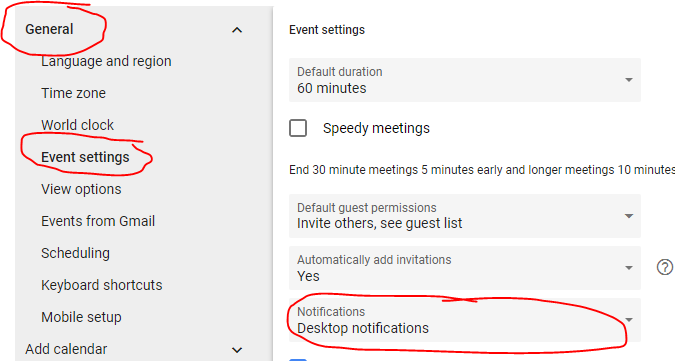
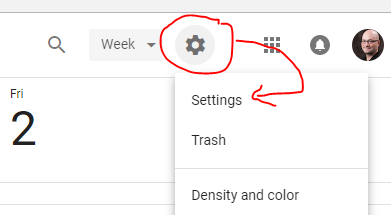
    <content type="html"><![CDATA[<h1 id="Enable-Google-Chrome-Desktop-Notifications-from-Gmail"><a href="#Enable-Google-Chrome-Desktop-Notifications-from-Gmail" class="headerlink" title="Enable Google Chrome Desktop Notifications from Gmail"></a>Enable Google Chrome Desktop Notifications from Gmail</h1><p>Ya know what is really embarassing? Missing a meeting with a group of people you really like working with. Don’t be a James. Get your Gmail notifications on your desktop and be on time for those important, team-bonding sessions.</p><p><img src="https://jcblogimages.blob.core.windows.net/img/2018-03-01-5d9370da.png" alt="Get All your notifications"></p><a id="more"></a><p>I recently joined the team at <a href="http://inventive.io" target="_blank" rel="noopener">Inventive</a> and I’m so geeked to be working with some pretty incredible folks. There is this great combination and balance of humor, humility and “get sh!t done” that is really pushing this old dog to keep up.  I love it.</p><p>Aaaaaaand then I go and miss two standups in my first week. Good grief, Charlie Brown. I’m thankful that “patience” and “grace” are also in this culture.</p><p>Inventive uses the Google apps suite of tools which is new-ish to me for complete workflow. I’ve only really used it once before, and the calendar app and the way they handle meeting notifications has changed. It used to be that Chrome would “pop over” what you were working on with the in-browser alerts. It was more than mildly annoying, but at the same time it kept me on top of my meetings.</p><p>But, no excuses. New tooling means new learning, so I had to dig around the new Calendar experience to find the setting I was looking for. I found an [older post] out there which pointed me in the right direction, but the new bits look like, well, different bits, so here I share.</p><h2 id="Get-to-Your-Settings"><a href="#Get-to-Your-Settings" class="headerlink" title="Get to Your Settings"></a>Get to Your Settings</h2><p>The first step is simply to drill into your calendar settings, so pop over to that app and open that up.</p><p><img src="https://jcblogimages.blob.core.windows.net/img/2018-03-01-bc4a6bb0.png" alt="Accessing the settings dialog"></p><p>Scroll down to the Event Settings under the General header, and select “Desktop Notifications” from the “Notifications” option. </p><p><img src="https://jcblogimages.blob.core.windows.net/img/2018-03-01-5d9370da.png" alt="Enable Desktop Notifications"></p><p>Now, close and restart your browser, then head back to your calendar. Chrome will prompt you to allow desktop notifications. If you say yes (why wouldn’t you at this point?) then you should see the following.</p><p><img src="https://jcblogimages.blob.core.windows.net/img/2018%5C2018-03-01-f3be7132.png" alt="Seeing the notification"></p><p>There. No more missed standups. The only catch seems to be that when you’re using multiple profiles you’re going to have to open Chrome up with the profile for which you’d like notifications enabled at least once after startup, but this is something you’re likely doing to get your mail and whatnot anyway.  Hope this helps!</p><p>Happy coding!</p>]]></content>
    
    <summary type="html">
    
      &lt;h1 id=&quot;Enable-Google-Chrome-Desktop-Notifications-from-Gmail&quot;&gt;&lt;a href=&quot;#Enable-Google-Chrome-Desktop-Notifications-from-Gmail&quot; class=&quot;headerlink&quot; title=&quot;Enable Google Chrome Desktop Notifications from Gmail&quot;&gt;&lt;/a&gt;Enable Google Chrome Desktop Notifications from Gmail&lt;/h1&gt;&lt;p&gt;Ya know what is really embarassing? Missing a meeting with a group of people you really like working with. Don’t be a James. Get your Gmail notifications on your desktop and be on time for those important, team-bonding sessions.&lt;/p&gt;
&lt;p&gt;&lt;img src=&quot;https://jcblogimages.blob.core.windows.net/img/2018-03-01-5d9370da.png&quot; alt=&quot;Get All your notifications&quot;&gt;&lt;/p&gt;
    
    </summary>
    
      <category term="Productivity" scheme="http://jameschambers.com/categories/Productivity/"/>
    
    
      <category term="Email" scheme="http://jameschambers.com/tags/Email/"/>
    
  </entry>
  
  <entry>
    <title>Duplicate &#39;Compile&#39; Items Included Error in Visual Studio</title>
    <link href="http://jameschambers.com/2017/11/duplicate-compile-items-included/"/>
    <id>http://jameschambers.com/2017/11/duplicate-compile-items-included/</id>
    <published>2017-11-12T22:00:00.000Z</published>
    <updated>2020-11-29T14:19:00.867Z</updated>
    
    <content type="html"><![CDATA[<p>This is an error I’ve gotten a few times lately in Visual Studio 2017 after renaming a file:</p><blockquote><p>Duplicate ‘Compile’ items were included. The .NET SDK includes ‘Compile’ items from your project directory by default. </p></blockquote><p>Thankfully, fixing this is pretty straightforward.</p><a id="more"></a><h2 id="How-I-Got-Here"><a href="#How-I-Got-Here" class="headerlink" title="How I Got Here"></a>How I Got Here</h2><p>I’m not sure what series of events led you to getting this error message, but for my project it happened when I was renaming a file in Visual Studio 2017. In my case, I had a file that contained a couple of classes that I intended to break out into separate files. None of the classes assumed the name of the file. My file was unsaved and I attempted to rename the file in the IDE to the name of one of the classes.</p><p>The full error message is as follows:</p><blockquote><p>Duplicate ‘Compile’ items were included. The .NET SDK includes ‘Compile’ items from your project directory by default. You can either remove these items from your project file, or set the ‘EnableDefaultCompileItems’ property to ‘false’ if you want to explicitly include them in your project file.</p></blockquote><p>After the IDE makes the change, I start getting the error message, along with all kinds of ‘unambiguous reference’ errors throughout my code.</p><p>The error message is offputting because it is worded in such a way that you’ve done something wrong. In my case, I haven’t touched my project file, so what is it that is causing the project file to contain invalid sections in my config?  The rename process in Visual Studio must include some staging steps where it tries its best to keep track of the in-progress changes, but it apparently doesn’t degrade gracefully.</p><p>Of course, if you’ve been meddling with the project file on your own, then you can’t pin it on Visual Studio ;)</p><h2 id="The-Fix"><a href="#The-Fix" class="headerlink" title="The Fix"></a>The Fix</h2><p>Reading the error message we can understand that the project file contains instructions to include a file explicitly in a ‘Compile’ section that is not required, because the file in question is already contained as part of the project path.</p><p>In the Solution Explorer, right-click on your project and select <code>Edit Project .csproj</code> from the context menu.</p><p>The full text of the error message will tell you the file name that is problematic, and it will be in a section that looks something like the following:</p><figure class="highlight plain"><table><tr><td class="gutter"><pre><span class="line">1</span><br><span class="line">2</span><br><span class="line">3</span><br></pre></td><td class="code"><pre><span class="line">&lt;ItemGroup&gt;</span><br><span class="line">  &lt;Compile Include=&quot;YourFolder\Namespace\ClassNameHere.cs&quot; /&gt;</span><br><span class="line">&lt;/ItemGroup&gt;</span><br></pre></td></tr></table></figure><p>It is safe to remove this ‘Compile’ node, along with the wrapping ‘ItemGroup’, provided the file is indeed in your path.  Before nuking the node, create a commit in  your source control software so that you can roll back if need be.</p><p>Happy Coding!</p>]]></content>
    
    <summary type="html">
    
      &lt;p&gt;This is an error I’ve gotten a few times lately in Visual Studio 2017 after renaming a file:&lt;/p&gt;
&lt;blockquote&gt;
&lt;p&gt;Duplicate ‘Compile’ items were included. The .NET SDK includes ‘Compile’ items from your project directory by default. &lt;/p&gt;
&lt;/blockquote&gt;
&lt;p&gt;Thankfully, fixing this is pretty straightforward.&lt;/p&gt;
    
    </summary>
    
      <category term="Development" scheme="http://jameschambers.com/categories/Development/"/>
    
    
      <category term="ASP.NET Core" scheme="http://jameschambers.com/tags/ASP-NET-Core/"/>
    
      <category term="Visual Studio 2017" scheme="http://jameschambers.com/tags/Visual-Studio-2017/"/>
    
  </entry>
  
  <entry>
    <title>AllReady - Moving to the Next Level</title>
    <link href="http://jameschambers.com/2017/11/AllReady-Moving-to-the-Next-Level/"/>
    <id>http://jameschambers.com/2017/11/AllReady-Moving-to-the-Next-Level/</id>
    <published>2017-11-10T15:00:00.000Z</published>
    <updated>2020-11-29T14:19:00.835Z</updated>
    
    <content type="html"><![CDATA[<p>3000+ commits, 1000+ pull requests, 120+ contributors and 2 years of development.  This has been an amazing ride, in so many ways, and so revealing in how developers around the world are wanting to jump in to use their skills to help the greater good. </p><p><img src="https://jcblogimages.blob.core.windows.net/img/2017/all-ready-next-level.png" alt="AllReady - Level Up"></p><p>Okay, community, you’ve responded to the call. Now it’s time to take this to the next level.<br><a id="more"></a><br>AllReady is a production-ready application. We have real-world tenure and work with national level organizations to help organize volunteers. Through our software, we can empower communities to best use their limited and valuable resources to prepare for disasters.</p><blockquote><p>Heroes are found amongst those who respond to disasters and those who help us prepare for them.  However, preparedness efforts often go unreported.  AllReady brings visibility and participation to the preparedness campaigns of the humanitarian organizations who work every day to reduce and ideally remove the impact of disasters big and small. - Tony Surma, Co-Founder and Vice President of HTBox </p></blockquote><h2 id="Community-Jumping-In"><a href="#Community-Jumping-In" class="headerlink" title="Community Jumping In"></a>Community Jumping In</h2><p>Be it in the recesses of their own space, crammed in a room with other developers or even through a virtual code-a-thon, the development community has embraced AllReady and the Humanitarian Toolbox cause.</p><p><img src="https://jcblogimages.blob.core.windows.net/img/2015/11/image.png" alt="Code-a-thon In Bellevue"></p><p>Originally conceived as a “technical demo with purpose”, AllReady has grown into an application with a healthy set of features.  </p><blockquote><p>AllReady is designed to to deliver preparedness services by replacing pen and paper with web and mobile apps. Our volunteers will be using AllReady to organize the installation of thousands of free smoke alarms. Traditionally, our focus has been on the heroic act of disaster response but in understanding that the mission of the American Red Cross is to alleviate suffering, isn’t it equally noble to empower volunteers everywhere to try and prevent that suffering in the first place?  - Jim McGowan, American Red Cross</p></blockquote><p>We’ve been through a couple of iterations, seen great feedback from different groups and skill levels and still managed to make significant progress entirely by the grace of our incredible volunteers. </p><p><img src="https://jcblogimages.blob.core.windows.net/img/2015/11/image1.png" alt="Hacking Together"></p><p>We’ve done our best to implement architecture worthy of production, automated build, test and deployment processes and swung with all the punches the changing world of .NET Core has thrown at us. And, when need be, we even get contributions from the ASP.NET team itself.</p><p>So far, we’ve encouraged developers of all skill levels to join the cause. We’ve mentored folks along the way, introduced them to git and GitHub and, of course ASP.NET Core. We’ve seen stars rise and get their Microsoft MVP based on their contributions and other community involvement (congrats to you , Steve!). </p><p>But where we stand now, the game is changing a little.</p><h2 id="Where-This-is-Going"><a href="#Where-This-is-Going" class="headerlink" title="Where This is Going"></a>Where This is Going</h2><p>We’ve put a lot of thought into taking the next steps of this project. It’s clear that the time has come for us to put the call out to senior developers who can make big impacts on short cycles.  However, we don’t want to exclude anyone and we will continue to support anyone who wishes to contribute, maintaining “up for grabs” issues and giving feedback through pull requests.</p><p><img src="https://jcblogimages.blob.core.windows.net/img/2015/11/image2.png" alt="Planning the Next Steps"></p><p>Up next on this project is some heavy lifting. We need folks to take our I/O bound code and move it into Azure functions. There is some refactoring that needs to be done to prevent “lava-flow architecture” from prevailing. We need to up our client-side game and move to a more modern and appealing JavaScript framework and client-side modules written in TypeScript.</p><h2 id="Who-We-Need"><a href="#Who-We-Need" class="headerlink" title="Who We Need"></a>Who We Need</h2><p>As such, we’re putting the call out, starting today, for senior developers who consider themselves as capably independent devs who can equally write c# and TypeScript and take cues from designers on how to get the UX just right.</p><p>We’re looking for some designers to take our project and imagine what a better user experience would like. We need your help to draw a few references and do some conceptual work on a few screens for us to use as both inspiration and guideline.</p><p>We’re hoping to find connections to other charitable </p><h2 id="The-Tech-Stack"><a href="#The-Tech-Stack" class="headerlink" title="The Tech Stack"></a>The Tech Stack</h2><p>You can be on any platform; the project runs on Windows, Mac and Linux. You don’t need Visual Studio 2017, but it may make your life a little easier. Minimally you’ll want a capable text-based IDE (like Visual Studio Code).</p><p>If you’re doing personal inventory, here’s what we’re after:</p><ul><li>strong experience in ASP.NET (Core is an asset) and the MVC Framework</li><li>familiarity with libraries like AutoFac, MediatR and AutoMapper</li><li>past exposure to Azure cloud services like Azure Functions, Service Bus,  Application Insights and storage</li><li>comfortable working with git, branching, forking, GitHub, pull requests and other similar concepts</li><li>familiarity with connected services such as SendGrid or Twillio</li></ul><p>If you don’t have these, but have a strong desire to learn, we’d also love your help, so please consider joining. There’s lots of work at all levels, priorities and complexities!</p><h2 id="How-to-Connect"><a href="#How-to-Connect" class="headerlink" title="How to Connect"></a>How to Connect</h2><p>If any of this piques your interest, we implore you to reach out!</p><p><a href="https://www.youtube.com/channel/UCMHQ4xrqudcTtaXFw4Bw54Q/videos?live_view=502&amp;flow=grid&amp;view=2" target="_blank" rel="noopener">We have semi-regular Community Standups which you can find on our YouTube channel.</a></p><p><a href="https://github.com/HTBox/allReady" target="_blank" rel="noopener">You can fork, clone and contribute via our GitHub repo.</a></p><p>You can find us on <a href="https://twitter.com/htbox" target="_blank" rel="noopener">Twitter</a> and <a href="https://www.facebook.com/allReadyApp/" target="_blank" rel="noopener">Facebook</a> (and the main <a href="https://www.facebook.com/htbox.org/" target="_blank" rel="noopener">HTBox Facebook</a> page as well).</p><p>You can join our <a href="https://github.com/HTBox/allReady/issues?q=is%3Aissue+is%3Aopen+label%3ANovemberthon" target="_blank" rel="noopener">Virtual Code-a-Thon</a> which runs from November 10-26, 2017.</p><p>Once connected on one of those avenues, we can also get you into our Slack channel to ask questions with project experts and leadership alike. </p><h2 id="Help-Us-Get-the-Word-Out"><a href="#Help-Us-Get-the-Word-Out" class="headerlink" title="Help Us Get the Word Out!"></a>Help Us Get the Word Out!</h2><p>Please tweet out this call to help, share it however you do social and let those who may be interested in joining the cause know about what is going on.</p><p>If you are a member or leader of a user group, please share with those in your community.</p><p>If you’re interested in having a code-a-thon featuring the AllReady project, please reach out to us and we will help you co-ordinate and even keynote the event if you like.</p><p>Thank you for taking a moment to help code for the greater good.</p><p>Happy Coding!</p>]]></content>
    
    <summary type="html">
    
      &lt;p&gt;3000+ commits, 1000+ pull requests, 120+ contributors and 2 years of development.  This has been an amazing ride, in so many ways, and so revealing in how developers around the world are wanting to jump in to use their skills to help the greater good. &lt;/p&gt;
&lt;p&gt;&lt;img src=&quot;https://jcblogimages.blob.core.windows.net/img/2017/all-ready-next-level.png&quot; alt=&quot;AllReady - Level Up&quot;&gt;&lt;/p&gt;
&lt;p&gt;Okay, community, you’ve responded to the call. Now it’s time to take this to the next level.&lt;br&gt;
    
    </summary>
    
      <category term="Development" scheme="http://jameschambers.com/categories/Development/"/>
    
      <category term="News" scheme="http://jameschambers.com/categories/Development/News/"/>
    
    
      <category term="ASP.NET Core" scheme="http://jameschambers.com/tags/ASP-NET-Core/"/>
    
      <category term="ASP.NET Core MVC" scheme="http://jameschambers.com/tags/ASP-NET-Core-MVC/"/>
    
      <category term="Visual Studio 2017" scheme="http://jameschambers.com/tags/Visual-Studio-2017/"/>
    
  </entry>
  
  <entry>
    <title>Diagrams In LocalDB Using SSMS</title>
    <link href="http://jameschambers.com/2017/11/Diagrams-In-LocalDB-Using-SSMS/"/>
    <id>http://jameschambers.com/2017/11/Diagrams-In-LocalDB-Using-SSMS/</id>
    <published>2017-11-06T21:17:28.000Z</published>
    <updated>2020-11-29T14:19:00.836Z</updated>
    
    <content type="html"><![CDATA[<p>Often you’ll find that a project is of a size where the data model is easier to visualize if you…well…if you visualize it. The canonical way to do this for those of us on the MS stack is through database diagrams in SQL Server Management Studio.</p><p><img src="https://jcblogimages.blob.core.windows.net/img/2017/ssms-title-slide.png" alt="Make Sense of Your LocalDb Models with SSMS"></p><a id="more"></a><h2 id="Not-Every-Project-Has-a-Data-Analyst"><a href="#Not-Every-Project-Has-a-Data-Analyst" class="headerlink" title="Not Every Project Has a Data Analyst"></a>Not Every Project Has a Data Analyst</h2><p>Historically, a large number of organizations have worked with data analysts that develop the schema for an application given a set of requirements using a set of powerful designer tools. These tools are capable of generating change scripts, comparing databases for changes and drawing out the relationships between entities. This is more true for larger applications, certainly more true in the enterprise space, and is a practice you can still see in operation today particularily in working with legacy code.</p><p>However, for smaller shops and projects and in the agile space, this is not the common approach. Many folks choose to evolve data models on the fly, use tools like data projects or migration tools like Roundhouse. And, in today’s advancements in EF, there are many projects that elect to use code first migrations which have evolved far beyond the one-way, strongly opinionated roots that first came to Entity Framework back in the unicorn days.</p><p>In my travels and in mentoring developers over the last few years I’ve found a surprising number of folks who haven’t seen the tooling that is freely available to them through SQL Server Management Studio, also known as SSMS.</p><h2 id="So-What-Does-My-Data-Look-Like"><a href="#So-What-Does-My-Data-Look-Like" class="headerlink" title="So, What Does My Data Look Like?"></a>So, What Does My Data Look Like?</h2><p>In an effort to better understand a fix or feature that I’m asked to help with, I often will sketch out the problem and the implementation. When this includes modifications to the schema I like to employ the use of a diagram in my effort.  While pen-and-paper would do just fine for most cases, it’s often handy to know data types, see any relationships and move things around as often as needed to clarify the picture of the problem I’m trying to solve.  And this is where tooling comes into play.</p><p>SSMS is a medium-weight utility that clocks in just under a gig (<a href="https://docs.microsoft.com/en-us/sql/ssms/download-sql-server-management-studio-ssms" target="_blank" rel="noopener">you can download it here</a>). It’s by no means small, but it is powerful and has some great cloud-connectivity capabilities as well. It’s designed for the fully-featured SQL Server SKUs, but it works just fine for LocalDB as well.</p><p>To get started with diagrams in LocalDB, simply invoke the context menu with a right-click on your database’s “Database Diagrams” node in SSMS’s Object Explorer.</p><p><img src="https://jcblogimages.blob.core.windows.net/img/2017/ssms-db-context-menu.png" alt="Context Menu When Clicking on a Database in the SSMS Object Explorer"></p><p>Click on the option for “Install Diagram Support”.</p><p><strong><em>Note</em></strong> I run on Windows 10 and I am not on a domain. There is no active directory on my machine. I have found that when I use code-first databases and EF migrations that I will get an error like <code>Microsoft SQL Server Error: 15404</code> saying:</p><blockquote><p>LocalDb could not obtain information about group/user (username)).</p></blockquote><p>This error also surfaces as ‘SQL Server error 0x534’, ‘0x54b’, ‘0x2147’.</p><p>You can get past this error by elevating your privileges on the database in question using the following command. To execute, just right-click on your database to get that context menu back and select “New Query”, then paste this in (and fix your DB name):</p><p><code>alter authorization on database::[your-db-name-no-quotes] to sa</code></p><p>This is okay with LocalDb instances running on your machine, as I’m assuming that you’re going to be running this locally. Be sure to consider best practicies, application-level security and your company policies before changing database permissions for databases your organization makes available at large. </p><p>With security set and ready to go you’re pretty much off to the races.</p><h2 id="Creating-Diagrams"><a href="#Creating-Diagrams" class="headerlink" title="Creating Diagrams"></a>Creating Diagrams</h2><p>This part is super easy.  Now that diagram support has been added just invoke that context menu again, but instead, this time choose “New Database Diagram”.  A blank canvas will appear and you’ll be prompted to add tables.</p><p><img src="https://jcblogimages.blob.core.windows.net/img/2017/ssms-adding-tables.png" alt="Add Tables to Your Diagrams"></p><p>Select the tables you want to learn more about and add them to your diagram. SSMS draws out any relationships that exist.</p><p><img src="https://jcblogimages.blob.core.windows.net/img/2017/ssms-simple-diagram.png" alt="A Simple Diagram in SSMS"></p><p>By default, tables will be displayed with only the column names. A much more useful rendering is to switch to the “Standard” view which will reveal extended properties of the columns.</p><p><img src="https://jcblogimages.blob.core.windows.net/img/2017/ssms-show-table-details.png" alt="Show Column Details in Your Database Diagram"></p><h2 id="Careful-There-Young-Gunner"><a href="#Careful-There-Young-Gunner" class="headerlink" title="Careful, There, Young Gunner"></a>Careful, There, Young Gunner</h2><p>SSMS has a whole host of other features baked into diagrams that I tend to avoid. You can create new tables, modify columns, change properties and create relationships. </p><p><strong>Don’t.</strong></p><p>I can’t see many scenarios where this would be a good idea. These types of things should be done through a managed and repeatable process that can be easily propogated to other developer workstations or out into production. Using the designer to do this will break my heart and also a kitten will die.</p><p>There is one case where this might be useful. If you are learning and want to better understand the SQL that is generated through the lens of something meaningful to you (like entities in your project) you might be able to use this as a learning tool. Go through with your changes in the designer (they are not saved by default), then select Database Diagram -&gt; Generate Change Scripts from the application menu. SSMS will prompt you to save out change scripts.</p><p><strong>Note:</strong> You may need to enable the setting called “Prevent saving changes that require table re-creation” in order to get some types of edits to work, otherwise you’ll see a message saying that “Saving changes is not permitted.”</p><p><img src="https://jcblogimages.blob.core.windows.net/img/2017/ssms-column-save.png" alt="Changes to a Table"></p><p>You can enable that setting in Tools -&gt; Options -&gt; Designers. </p><p>To it’s credit, SSMS does a healthy job of trying to preserve your data. Here, I’ve simply added a column to the <code>CampaignGoal</code> table, but you can see what SSMS is trying to do behind the scenes with its change script:</p><figure class="highlight plain"><table><tr><td class="gutter"><pre><span class="line">1</span><br><span class="line">2</span><br><span class="line">3</span><br><span class="line">4</span><br><span class="line">5</span><br><span class="line">6</span><br><span class="line">7</span><br><span class="line">8</span><br><span class="line">9</span><br><span class="line">10</span><br><span class="line">11</span><br><span class="line">12</span><br><span class="line">13</span><br><span class="line">14</span><br><span class="line">15</span><br><span class="line">16</span><br><span class="line">17</span><br><span class="line">18</span><br><span class="line">19</span><br><span class="line">20</span><br><span class="line">21</span><br><span class="line">22</span><br><span class="line">23</span><br><span class="line">24</span><br><span class="line">25</span><br><span class="line">26</span><br><span class="line">27</span><br><span class="line">28</span><br><span class="line">29</span><br><span class="line">30</span><br><span class="line">31</span><br><span class="line">32</span><br><span class="line">33</span><br><span class="line">34</span><br><span class="line">35</span><br><span class="line">36</span><br><span class="line">37</span><br><span class="line">38</span><br><span class="line">39</span><br><span class="line">40</span><br><span class="line">41</span><br><span class="line">42</span><br><span class="line">43</span><br><span class="line">44</span><br><span class="line">45</span><br><span class="line">46</span><br><span class="line">47</span><br><span class="line">48</span><br><span class="line">49</span><br><span class="line">50</span><br><span class="line">51</span><br><span class="line">52</span><br><span class="line">53</span><br><span class="line">54</span><br><span class="line">55</span><br><span class="line">56</span><br><span class="line">57</span><br><span class="line">58</span><br><span class="line">59</span><br><span class="line">60</span><br><span class="line">61</span><br><span class="line">62</span><br><span class="line">63</span><br><span class="line">64</span><br><span class="line">65</span><br><span class="line">66</span><br><span class="line">67</span><br><span class="line">68</span><br><span class="line">69</span><br><span class="line">70</span><br><span class="line">71</span><br><span class="line">72</span><br><span class="line">73</span><br><span class="line">74</span><br><span class="line">75</span><br><span class="line">76</span><br><span class="line">77</span><br></pre></td><td class="code"><pre><span class="line">/* To prevent any potential data loss issues, you should review this script in detail before running it outside the context of the database designer.*/</span><br><span class="line">BEGIN TRANSACTION</span><br><span class="line">SET QUOTED_IDENTIFIER ON</span><br><span class="line">SET ARITHABORT ON</span><br><span class="line">SET NUMERIC_ROUNDABORT OFF</span><br><span class="line">SET CONCAT_NULL_YIELDS_NULL ON</span><br><span class="line">SET ANSI_NULLS ON</span><br><span class="line">SET ANSI_PADDING ON</span><br><span class="line">SET ANSI_WARNINGS ON</span><br><span class="line">COMMIT</span><br><span class="line">BEGIN TRANSACTION</span><br><span class="line">GO</span><br><span class="line">ALTER TABLE dbo.CampaignGoal</span><br><span class="line">DROP CONSTRAINT FK_CampaignImpact_Campaign_CampaignId</span><br><span class="line">GO</span><br><span class="line">ALTER TABLE dbo.Campaign SET (LOCK_ESCALATION = TABLE)</span><br><span class="line">GO</span><br><span class="line">COMMIT</span><br><span class="line">BEGIN TRANSACTION</span><br><span class="line">GO</span><br><span class="line">ALTER TABLE dbo.CampaignGoal</span><br><span class="line">DROP CONSTRAINT DF__CampaignI__Campa__0F624AF8</span><br><span class="line">GO</span><br><span class="line">CREATE TABLE dbo.Tmp_CampaignGoal</span><br><span class="line">(</span><br><span class="line">Id int NOT NULL IDENTITY (1, 1),</span><br><span class="line">CurrentGoalLevel int NOT NULL,</span><br><span class="line">Display bit NOT NULL,</span><br><span class="line">GoalType int NOT NULL,</span><br><span class="line">NumericGoal int NOT NULL,</span><br><span class="line">TextualGoal nvarchar(MAX) NULL,</span><br><span class="line">Notes nchar(10) NULL,</span><br><span class="line">CampaignId int NOT NULL</span><br><span class="line">)  ON [PRIMARY]</span><br><span class="line"> TEXTIMAGE_ON [PRIMARY]</span><br><span class="line">GO</span><br><span class="line">ALTER TABLE dbo.Tmp_CampaignGoal SET (LOCK_ESCALATION = TABLE)</span><br><span class="line">GO</span><br><span class="line">ALTER TABLE dbo.Tmp_CampaignGoal ADD CONSTRAINT</span><br><span class="line">DF__CampaignI__Campa__0F624AF8 DEFAULT ((0)) FOR CampaignId</span><br><span class="line">GO</span><br><span class="line">SET IDENTITY_INSERT dbo.Tmp_CampaignGoal ON</span><br><span class="line">GO</span><br><span class="line">IF EXISTS(SELECT * FROM dbo.CampaignGoal)</span><br><span class="line"> EXEC(&apos;INSERT INTO dbo.Tmp_CampaignGoal (Id, CurrentGoalLevel, Display, GoalType, NumericGoal, TextualGoal, CampaignId)</span><br><span class="line">SELECT Id, CurrentGoalLevel, Display, GoalType, NumericGoal, TextualGoal, CampaignId FROM dbo.CampaignGoal WITH (HOLDLOCK TABLOCKX)&apos;)</span><br><span class="line">GO</span><br><span class="line">SET IDENTITY_INSERT dbo.Tmp_CampaignGoal OFF</span><br><span class="line">GO</span><br><span class="line">DROP TABLE dbo.CampaignGoal</span><br><span class="line">GO</span><br><span class="line">EXECUTE sp_rename N&apos;dbo.Tmp_CampaignGoal&apos;, N&apos;CampaignGoal&apos;, &apos;OBJECT&apos; </span><br><span class="line">GO</span><br><span class="line">ALTER TABLE dbo.CampaignGoal ADD CONSTRAINT</span><br><span class="line">PK_CampaignImpact PRIMARY KEY CLUSTERED </span><br><span class="line">(</span><br><span class="line">Id</span><br><span class="line">) WITH( STATISTICS_NORECOMPUTE = OFF, IGNORE_DUP_KEY = OFF, ALLOW_ROW_LOCKS = ON, ALLOW_PAGE_LOCKS = ON) ON [PRIMARY]</span><br><span class="line"></span><br><span class="line">GO</span><br><span class="line">CREATE NONCLUSTERED INDEX IX_CampaignImpact_CampaignId ON dbo.CampaignGoal</span><br><span class="line">(</span><br><span class="line">CampaignId</span><br><span class="line">) WITH( STATISTICS_NORECOMPUTE = OFF, IGNORE_DUP_KEY = OFF, ALLOW_ROW_LOCKS = ON, ALLOW_PAGE_LOCKS = ON) ON [PRIMARY]</span><br><span class="line">GO</span><br><span class="line">ALTER TABLE dbo.CampaignGoal ADD CONSTRAINT</span><br><span class="line">FK_CampaignImpact_Campaign_CampaignId FOREIGN KEY</span><br><span class="line">(</span><br><span class="line">CampaignId</span><br><span class="line">) REFERENCES dbo.Campaign</span><br><span class="line">(</span><br><span class="line">Id</span><br><span class="line">) ON UPDATE  NO ACTION </span><br><span class="line"> ON DELETE  CASCADE </span><br><span class="line"></span><br><span class="line">GO</span><br><span class="line">COMMIT</span><br></pre></td></tr></table></figure><p>Personally, I find <code>dotnet ef migrations add new-notes-field</code> a lot easier to do.</p><h2 id="Next-Steps"><a href="#Next-Steps" class="headerlink" title="Next Steps"></a>Next Steps</h2><p>Database Diagrams are local to your computer and are not part of your code base. If you’re using EF and code-first, chances are you’ve never seen a “picture” of your model. Grab yourself a copy of <a href="https://docs.microsoft.com/en-us/sql/ssms/download-sql-server-management-studio-ssms" target="_blank" rel="noopener">SQL Server Management Studio</a> and get sketching. </p><p>That feature ain’t going to finish itself ;)</p><p>Happy coding!</p>]]></content>
    
    <summary type="html">
    
      &lt;p&gt;Often you’ll find that a project is of a size where the data model is easier to visualize if you…well…if you visualize it. The canonical way to do this for those of us on the MS stack is through database diagrams in SQL Server Management Studio.&lt;/p&gt;
&lt;p&gt;&lt;img src=&quot;https://jcblogimages.blob.core.windows.net/img/2017/ssms-title-slide.png&quot; alt=&quot;Make Sense of Your LocalDb Models with SSMS&quot;&gt;&lt;/p&gt;
    
    </summary>
    
      <category term="Development" scheme="http://jameschambers.com/categories/Development/"/>
    
      <category term="Database" scheme="http://jameschambers.com/categories/Development/Database/"/>
    
    
      <category term="ASP.NET Core MVC" scheme="http://jameschambers.com/tags/ASP-NET-Core-MVC/"/>
    
      <category term="SQL Server" scheme="http://jameschambers.com/tags/SQL-Server/"/>
    
      <category term="SQL Server Management Studio" scheme="http://jameschambers.com/tags/SQL-Server-Management-Studio/"/>
    
      <category term="Entity Framework" scheme="http://jameschambers.com/tags/Entity-Framework/"/>
    
  </entry>
  
  <entry>
    <title>ASP.NET Core Training in Calgary, Alberta</title>
    <link href="http://jameschambers.com/2017/01/ASP-NET-Core-Training-in-Calgary-AB/"/>
    <id>http://jameschambers.com/2017/01/ASP-NET-Core-Training-in-Calgary-AB/</id>
    <published>2017-01-02T14:00:08.000Z</published>
    <updated>2020-11-29T14:19:00.835Z</updated>
    
    <content type="html"><![CDATA[<p>For some folks, working independently and plowing through a book chapter-by-chapter is the best way for them to learn. If you’re in that camp, I’ve got just the book for you.</p><p><a href="http://click.linksynergy.com/link?id=hKA2dsKjtSk&amp;offerid=145238.2497285&amp;type=2&amp;murl=http%3A%2F%2Fwww.informit.com%2Ftitle%2F9781509304066" target="_blank" rel="noopener"><img src="https://jcblogimages.blob.core.windows.net:443/img/2017/aspnetcore_book.png" alt></a></p><p class="article-more-link"><br>    <a href="http://click.linksynergy.com/link?id=hKA2dsKjtSk&offerid=145238.2497285&type=2&murl=http%3A%2F%2Fwww.informit.com%2Ftitle%2F9781509304066" target="_blank" rel="noopener">Buy the book</a><br></p><h2 id="Want-to-get-Hands-On"><a href="#Want-to-get-Hands-On" class="headerlink" title="Want to get Hands-On?"></a>Want to get Hands-On?</h2><p>For others, in-person training is the most effective way to dive into new content. Having someone in the same room who knows how to navigate a new release of software, framework and tooling and all the related changes is a powerful asset while you learn.</p><p>That said, we are pleased to announce our first Monsters workshop in Calgary, Alberta. Please join us in Calgary as we mash on changes, approaches, caveats and wins for all things in ASP.NET Core.</p><a id="more"></a><p>Already interested? You can <a href="https://training.aspnetmonsters.com" target="_blank" rel="noopener">sign up today</a> and join us in February from the 22nd to the 24th.</p><p class="article-more-link"><br>    <a href="https://training.aspnetmonsters.com" target="_blank" rel="noopener">Register for training</a><br></p><h2 id="We’re-Going-To-Learn-a-Lot-Together"><a href="#We’re-Going-To-Learn-a-Lot-Together" class="headerlink" title="We’re Going To Learn a Lot Together!"></a>We’re Going To Learn a Lot Together!</h2><p>My good friends <a href="https://twitter.com/dave_paquette" target="_blank" rel="noopener">Dave</a>, <a href="https://twitter.com/stimms" target="_blank" rel="noopener">Simon</a> and I have been mashing on ASP.NET Core since its inception. This workshop is the culmination of what we have learned along the way and applied in our projects, samples and through our videos on Microsoft’s Channel 9. We’re taking you deep into three fully-packed days that walk you through various stages of application development. Our number one priority is to equip you with the skills you need to start on a Core MVC project and transition your existing skills to the new tooling.</p><p>We expect you to be familiar with web technologies and to be comfortable in Visual Studio. Beyond that, here is some of what you can expect:</p><ul><li>A solid foundation of ASP.NET Core with which you can build MVC applications</li><li>Exposure to configuration, testing and extensibility</li><li>Tips, samples and exercises that will guide you as you build software in the cloud</li><li>An understanding of data access using the latest version of Entity Framework</li><li>Access to the labs and source code used in the workshop</li></ul><p>Be sure to check out our training site to <a href="https://training.aspnetmonsters.com" target="_blank" rel="noopener">view the full curriculum</a>.</p><h2 id="Location-Location-Location"><a href="#Location-Location-Location" class="headerlink" title="Location, Location, Location"></a>Location, Location, Location</h2><p>Calgary and area is home to some of the most beautiful sights in Canada, with a mountain range full of winter sports about an hour away, skiing at Calgary’s Olympic Park as well as NHL and WHL Hockey on the edge of downtown. There are great restaurants, museums, art exhibits and theatre, along with with a great night life including brew pubs, world-famous Canadian poutine and an assortment of comedy clubs.</p><p>If you’re joining us from outside the area, we highly recommend adding on a few days to your trip so that you can explore the area. If you are from outside of Canada, <b>you will need to get a valid International Driver’s Permit</b> from your country before you leave if you wish to rent a car when you’re here (handy for exploring!).</p><p><b>Can’t join us in Calgary?</b> No problem. Just hit the registration page and sign up for our email last to be notified of other upcoming training cities.</p><p>Happy New Year, and happy coding!</p><p class="article-more-link"><br>    <a href="https://training.aspnetmonsters.com" target="_blank" rel="noopener">Register for training</a><br></p>]]></content>
    
    <summary type="html">
    
      &lt;p&gt;For some folks, working independently and plowing through a book chapter-by-chapter is the best way for them to learn. If you’re in that camp, I’ve got just the book for you.&lt;/p&gt;
&lt;p&gt;&lt;a href=&quot;http://click.linksynergy.com/link?id=hKA2dsKjtSk&amp;amp;offerid=145238.2497285&amp;amp;type=2&amp;amp;murl=http%3A%2F%2Fwww.informit.com%2Ftitle%2F9781509304066&quot; target=&quot;_blank&quot; rel=&quot;noopener&quot;&gt;&lt;img src=&quot;https://jcblogimages.blob.core.windows.net:443/img/2017/aspnetcore_book.png&quot; alt&gt;&lt;/a&gt;&lt;/p&gt;
&lt;p class=&quot;article-more-link&quot;&gt;&lt;br&gt;    &lt;a href=&quot;http://click.linksynergy.com/link?id=hKA2dsKjtSk&amp;offerid=145238.2497285&amp;type=2&amp;murl=http%3A%2F%2Fwww.informit.com%2Ftitle%2F9781509304066&quot; target=&quot;_blank&quot; rel=&quot;noopener&quot;&gt;Buy the book&lt;/a&gt;&lt;br&gt;&lt;/p&gt;

&lt;h2 id=&quot;Want-to-get-Hands-On&quot;&gt;&lt;a href=&quot;#Want-to-get-Hands-On&quot; class=&quot;headerlink&quot; title=&quot;Want to get Hands-On?&quot;&gt;&lt;/a&gt;Want to get Hands-On?&lt;/h2&gt;&lt;p&gt;For others, in-person training is the most effective way to dive into new content. Having someone in the same room who knows how to navigate a new release of software, framework and tooling and all the related changes is a powerful asset while you learn.&lt;/p&gt;
&lt;p&gt;That said, we are pleased to announce our first Monsters workshop in Calgary, Alberta. Please join us in Calgary as we mash on changes, approaches, caveats and wins for all things in ASP.NET Core.&lt;/p&gt;
    
    </summary>
    
      <category term="Development" scheme="http://jameschambers.com/categories/Development/"/>
    
      <category term="News" scheme="http://jameschambers.com/categories/Development/News/"/>
    
    
      <category term="ASP.NET Core" scheme="http://jameschambers.com/tags/ASP-NET-Core/"/>
    
      <category term="ASP.NET Core MVC" scheme="http://jameschambers.com/tags/ASP-NET-Core-MVC/"/>
    
      <category term="Visual Studio 2017" scheme="http://jameschambers.com/tags/Visual-Studio-2017/"/>
    
      <category term="Web API" scheme="http://jameschambers.com/tags/Web-API/"/>
    
  </entry>
  
  <entry>
    <title>Writing Azure Functions in F#</title>
    <link href="http://jameschambers.com/2016/11/2016-11-16-writing-azure-functions-in-fsharp/"/>
    <id>http://jameschambers.com/2016/11/2016-11-16-writing-azure-functions-in-fsharp/</id>
    <published>2016-11-19T23:00:00.000Z</published>
    <updated>2020-11-29T14:19:00.834Z</updated>
    
    <content type="html"><![CDATA[<p><strong>Guest post by Monster Simon Timms</strong> </p><p>My good friend <a href="https://twitter.com/stimms" target="_blank" rel="noopener">Simon Timms</a> (not Tibbs) reached out to me on the first day of this series and said, “I’d love to write a post on Functions using F#”. I said that sounded like a fantastic idea, and now here we are. (Well, here I am, with his post. He’s on a beach…) </p><p><img src="https://jcblogimages.blob.core.windows.net:443/img/2016/11/azure_functions_fsharp_title.png" alt="Writing Azure Functions in F#"></p><a id="more"></a><p><em>This article is part of an ongoing series on <a href="../Five-Days-of-Azure-Functions/">Azure Functions</a></em>.</p><p><em>Thanks</em> Thanks to James for letting me guest author on his blog. I love functions and I love F# so this was a fun post to write.<br>-Simon</p><p><em>Psst…thanks back at you Simon! Great post and honoured you offered to write it as an addition to the series!</em></p><p>Azure functions can be written directly in a wide variety of languages:</p><ul><li>Bash</li><li>Batch</li><li>C# </li><li>F#</li><li>Python</li><li>JavaScript </li><li>Powershell</li></ul><p>You can also build an executable which can run on Windows and upload it to the function to be executed. This approach allows for maximum compatibility with most any workload you can throw at it. Of all the natively supported languages I think F# fits most nicely into the functional mold. </p><p>Of course you can write your functions in C# and everything will be fine but wouldn’t you rather write them in a functional programming language? </p><p>F# isn’t perhaps a pure functional programming language but it is close enough to have some great advantages over C#. Declarations are immutable by default, the syntax is terse and stylish, null exceptions are all but unheard of and it has fantastic support for filter which are useful when dealing with any sort of complex data. It is a natively supported language on Azure Functions so let’s see how that works. </p><p>You can start with a new Azure function but instead of selecting C# let’s take F#. For our example we’ll base it off of the HTTP Triggered function.</p><p><img src="https://jcblogimages.blob.core.windows.net:443/img/2016/11/azure_functions_fsharp_select_http_trigger.png" alt="azure_functions_fsharp_select_trigger.png"></p><p>In our scenario we’d like to pull back the headlines from the BBC World Service in JSON format. This, as it turns out, is pretty easy to do in F# thanks to type providers. </p><p>A type provider is a compile-time shim which can be used to generate types from a variety of different data sources. The FSharp.Data project includes providers for such things as CSV, XML, Json and databases among other data sources. You can read more about it at <a href="https://fsharp.github.io/FSharp.Data/index.html" target="_blank" rel="noopener">their website</a>. We can start our project by adding a new file to the solution, a project.json. This will allow downloading and including libraries from nuget. </p><p>Our project needs the type provider and also a handy Json serializer. We’ll include the latest FSharp.Data and Newtonsoft.Json:</p><figure class="highlight plain"><table><tr><td class="gutter"><pre><span class="line">1</span><br><span class="line">2</span><br><span class="line">3</span><br><span class="line">4</span><br><span class="line">5</span><br><span class="line">6</span><br><span class="line">7</span><br><span class="line">8</span><br><span class="line">9</span><br><span class="line">10</span><br></pre></td><td class="code"><pre><span class="line">&#123;</span><br><span class="line">  &quot;frameworks&quot;: &#123;</span><br><span class="line">    &quot;net46&quot;:&#123;</span><br><span class="line">      &quot;dependencies&quot;: &#123;</span><br><span class="line">        &quot;FSharp.Data&quot;: &quot;2.3.2&quot;,</span><br><span class="line">        &quot;Newtonsoft.Json&quot;: &quot;9.0.1&quot;</span><br><span class="line">      &#125;</span><br><span class="line">    &#125;</span><br><span class="line">   &#125;</span><br><span class="line">&#125;</span><br></pre></td></tr></table></figure><p>Once you save that file you should see a restore started by the functions runtime. This will download and stage your libraries. </p><p>Now onto the actual F#. Start by opening the run.fsx file anc clearing it out. We’ll need to include the libraries we’ve just downloaded form nuget</p><figure class="highlight plain"><table><tr><td class="gutter"><pre><span class="line">1</span><br><span class="line">2</span><br><span class="line">3</span><br><span class="line">4</span><br><span class="line">5</span><br><span class="line">6</span><br><span class="line">7</span><br><span class="line">8</span><br></pre></td><td class="code"><pre><span class="line">#r &quot;System.Net.Http&quot;</span><br><span class="line">#r &quot;FSharp.Data&quot;</span><br><span class="line">#r &quot;Newtonsoft.Json&quot;</span><br><span class="line"></span><br><span class="line">open System.Net</span><br><span class="line">open System.Net.Http</span><br><span class="line">open FSharp.Data</span><br><span class="line">open Newtonsoft.Json</span><br></pre></td></tr></table></figure><p>With all our libraries properly referenced we can pull the definition of the BBC’s RSS feed into a type. Remember this will be done at compiles time so you don’t have access to runtime variables like settings in the environment. </p><figure class="highlight plain"><table><tr><td class="gutter"><pre><span class="line">1</span><br><span class="line">2</span><br></pre></td><td class="code"><pre><span class="line"></span><br><span class="line">type RSS = XmlProvider&lt;&quot;http://feeds.bbci.co.uk/news/rss.xml&quot;&gt;</span><br></pre></td></tr></table></figure><p>As simply as that we now have a type called RSS which is generated from the BBC’s RSS feed. This could have been any feed or format, the XmlProvider just downloads the file and infers the schema.</p><p>Now the meat of the problem, download the feed, get the titles and convert them into Json</p><figure class="highlight plain"><table><tr><td class="gutter"><pre><span class="line">1</span><br><span class="line">2</span><br><span class="line">3</span><br><span class="line">4</span><br><span class="line">5</span><br><span class="line">6</span><br><span class="line">7</span><br><span class="line">8</span><br><span class="line">9</span><br></pre></td><td class="code"><pre><span class="line">let Run(req: HttpRequestMessage, log: TraceWriter) =</span><br><span class="line">    log.Info(sprintf </span><br><span class="line">        &quot;F# HTTP trigger function processed a request. &quot;)</span><br><span class="line">    </span><br><span class="line">    let articles = RSS.GetSample()</span><br><span class="line">    log.Info(articles.Channel.Title)</span><br><span class="line"></span><br><span class="line">    let titles = articles.Channel.Items |&gt; Seq.map(fun x -&gt; x.Title )</span><br><span class="line">    req.CreateResponse(HttpStatusCode.OK, JsonConvert.SerializeObject(titles));</span><br></pre></td></tr></table></figure><p>This code downloads the RSS feed, logs out the title then maps out the item titles and returns it as a Json serialized array. If you’re new to F# you might have noticed that we don’t explicitly return anything. F# will implicitly return the last line of your function. </p><p>At the time of writing the output of this function looks like </p><figure class="highlight plain"><table><tr><td class="gutter"><pre><span class="line">1</span><br></pre></td><td class="code"><pre><span class="line">&quot;[\&quot;Hillary Clinton: I wanted to curl up with book after election loss\&quot;,\&quot;Liz Truss urged to &apos;get a grip&apos; on minimum-term inmates\&quot;,\&quot;Whiplash plans to &apos;cut car insurance premiums by £40&apos;\&quot;,\&quot;Plans to curb House of Lords powers &apos;dropped&apos;\&quot;,\&quot;Leonard Cohen: Singer died in sleep after fall\&quot;,\&quot;Price of Football 2016: Premier League cuts cost of tickets\&quot;,\&quot;Dementia game &apos;shows lifelong navigational decline&apos;\&quot;,\&quot;Animals still poached in &apos;horrifying numbers&apos; - Prince William\&quot;,\&quot;Online calculator predicts IVF baby chances\&quot;,\&quot;Hillsborough: Sir Norman Bettison defends book on disaster\&quot;,\&quot;RSPB hails &apos;remarkable&apos; recovery of threatened cirl bunting\&quot;,\&quot;Most common surnames in Britain and Ireland revealed\&quot;,\&quot;Meet the girl, 4, who called 999 and saved her mum&apos;s life\&quot;,\&quot;Donald Trump&apos;s name removed from NYC buildings\&quot;,\&quot;Price of Football 2016: Away tickets can cost more in Championship than Premier League\&quot;,\&quot;Mosul battle: Inside an Islamic State mortar factory\&quot;,\&quot;Airbus crew train in Stornoway crosswinds\&quot;,\&quot;The video game that&apos;s actually dementia research\&quot;,\&quot;China traffic dance video goes viral\&quot;,\&quot;Part of an Eiffel Tower staircase up for auction\&quot;,\&quot;BBC Breakfast\&quot;,\&quot;What will President Trump do about North Korea?\&quot;,\&quot;Phil Mercer: Australia&apos;s child poverty &apos;national shame&apos;\&quot;,\&quot;Is Nigel Farage heading for the Lords?\&quot;,\&quot;Pidgin - West African lingua franca\&quot;,\&quot;Trump presidency: Your questions answered\&quot;,\&quot;How does the UK&apos;s Supreme Court work?\&quot;,\&quot;Newspaper headlines: Steak in prison and &apos;Three Lions party&apos;\&quot;,\&quot;The Blood Forest\&quot;,\&quot;Supermoon\&quot;,\&quot;Picking up the pieces\&quot;,\&quot;Week in pictures: 5 - 11 November 2016\&quot;,\&quot;Your pictures\&quot;,\&quot;Andy Murray beats Kei Nishikori at ATP World Tour Finals in London\&quot;,\&quot;Wayne Rooney apologises to England chiefs over &apos;inappropriate&apos; images\&quot;,\&quot;Women&apos;s Champions League: Brondby 1-1 Manchester City Women (agg 1-2)\&quot;,\&quot;Brackley Town 4-3 Gillingham (aet)\&quot;,\&quot;Whites v blacks\&quot;,\&quot;&apos;He&apos;s a devil&apos;\&quot;,\&quot;Price of Football\&quot;,\&quot;Sick and stranded\&quot;,\&quot;Battle of the barnets\&quot;,\&quot;Fake news quiz\&quot;,\&quot;Housing squeeze\&quot;,\&quot;Virtual Ariel\&quot;]&quot;</span><br></pre></td></tr></table></figure><p>Of course the F# used here isn’t very idiomatic. Let’s clear it up a bit </p><figure class="highlight plain"><table><tr><td class="gutter"><pre><span class="line">1</span><br><span class="line">2</span><br><span class="line">3</span><br><span class="line">4</span><br><span class="line">5</span><br><span class="line">6</span><br><span class="line">7</span><br><span class="line">8</span><br><span class="line">9</span><br></pre></td><td class="code"><pre><span class="line">let Run(req: HttpRequestMessage, log: TraceWriter) =</span><br><span class="line">    log.Info(sprintf </span><br><span class="line">        &quot;F# HTTP trigger function processed a request. &quot;)</span><br><span class="line">    </span><br><span class="line">    req.CreateResponse(HttpStatusCode.OK, </span><br><span class="line">        RSS.GetSample().Channel.Items |&gt; </span><br><span class="line">        Seq.map(fun x -&gt; x.Title ) |&gt; </span><br><span class="line">        JsonConvert.SerializeObject</span><br><span class="line">    )</span><br></pre></td></tr></table></figure><p>With that we have an Azure Function written in a functional programming language. 20 lines all told,including blank lines.</p><h2 id="Other-articles-in-this-series"><a href="#Other-articles-in-this-series" class="headerlink" title="Other articles in this series"></a>Other articles in this series</h2><ul><li>Day 1: <a href="../How-to-organize-types-in-your-scripts">How to organize types in your Azure Function scripts</a></li><li>Day 2: <a href="../Resizing-Images-Using-Azure-Functions">How to resize an image uploaded to Azure Blog Storage</a></li><li>Day 3: <a href="../Fan-out-workloads-in-Azure-Function-Apps">How to &quot;fan out&quot; work so your Functions can scale</a></li><li>Day 4: <a href="../deploy-functions-from-github">How to deploy to Azure Functions using GitHub</a></li><li>Day 4.5: <a href="../2016-11-19-writing-azure-functions-in-fsharp">Writing Azure Functions in F#</a> <em>Guest Post by Simon Timms</em></li><li>Day 5: How to import third-party libraries (Up Next!)</li></ul>]]></content>
    
    <summary type="html">
    
      &lt;p&gt;&lt;strong&gt;Guest post by Monster Simon Timms&lt;/strong&gt; &lt;/p&gt;
&lt;p&gt;My good friend &lt;a href=&quot;https://twitter.com/stimms&quot; target=&quot;_blank&quot; rel=&quot;noopener&quot;&gt;Simon Timms&lt;/a&gt; (not Tibbs) reached out to me on the first day of this series and said, “I’d love to write a post on Functions using F#”. I said that sounded like a fantastic idea, and now here we are. (Well, here I am, with his post. He’s on a beach…) &lt;/p&gt;
&lt;p&gt;&lt;img src=&quot;https://jcblogimages.blob.core.windows.net:443/img/2016/11/azure_functions_fsharp_title.png&quot; alt=&quot;Writing Azure Functions in F#&quot;&gt;&lt;/p&gt;
    
    </summary>
    
      <category term="Development" scheme="http://jameschambers.com/categories/Development/"/>
    
    
      <category term="Azure" scheme="http://jameschambers.com/tags/Azure/"/>
    
      <category term="Azure Functions" scheme="http://jameschambers.com/tags/Azure-Functions/"/>
    
  </entry>
  
  <entry>
    <title>How to deploy to Azure Functions using GitHub</title>
    <link href="http://jameschambers.com/2016/11/deploy-functions-from-github/"/>
    <id>http://jameschambers.com/2016/11/deploy-functions-from-github/</id>
    <published>2016-11-17T13:02:07.000Z</published>
    <updated>2020-11-29T14:19:00.866Z</updated>
    
    <content type="html"><![CDATA[<p>When we start getting serious about using Azure Functions, we’re likely going to want a little more horsepower to edit them. Visual Studio gives us a top-flight editing experience, but how do we work with Azure Functions locally? And how do we deploy them to the cloud?</p><p><img src="https://jcblogimages.blob.core.windows.net:443/img/2016/11/deploy-from-git.png" alt></p><p>When we use GitHub to store our code, we enable an easy way to deploy our functions continuously to Azure, but it doesn’t come without caveats. This post is about getting you familiar with the benefits, side-effects and consideration points you’ll need to make as you move towards continuous deployment in Azure Functions.</p><a id="more"></a><p><em>This article is part of an ongoing series on <a href="../Five-Days-of-Azure-Functions/">Azure Functions</a></em>.</p><h2 id="How-This-Works"><a href="#How-This-Works" class="headerlink" title="How This Works"></a>How This Works</h2><p>Here is a high-level summary of how your code gets from GitHub (or any other source control service you configure) out to your Azure Function App:</p><ul><li>You check in some code</li><li>A postback is consumed by a service in Azure</li><li>Your code is cloned to a local-to-Azure path</li><li>A deployment is created for you</li><li>Have some coffee</li></ul><p>Let’s have a look at a few of the details up close.</p><h2 id="Setting-up-Deployment-from-Source-Control"><a href="#Setting-up-Deployment-from-Source-Control" class="headerlink" title="Setting up Deployment from Source Control"></a>Setting up Deployment from Source Control</h2><p>There’s a pretty easy trail to follow in the Azure Portal to get GitHub hooked up, with the one requirement being that you have a repository ready to go. Create the repo and push it to GitHub (or create it on GitHub) then navigate through the Functions Apps UI to “Function app settings” and then under “Deploy” click on “Configure continuous deployment” to sign in to GitHub and pick your repo.</p><p>But if you’ve already created a few functions in your app, you will want to get those down to your computer to work on them in Visual Studio and put them under source control. Here’s how to do it:</p><ol><li>If you didn’t create it locally, clone your repo down to your machine</li><li>Download your functions from the Kudu portal (this will be a ZIP, see below)</li><li>Unzip the functions archive and copy the functions into the root of your repo, there will be one folder per function</li><li>Open the files in Visual Studio and hack away</li><li>Commit and push your changes</li></ol><p>In step 2 I mention downloading the wwwroot directory from the Kudu console. To do that, head back to “Function app settings” and then under “Deploy” click on “Go to Kudu”. Drill into the `site directory and then click on the download icon to get your functions. </p><p><img src="https://jcblogimages.blob.core.windows.net:443/img/2016/11/download-functions.png" alt></p><p>You could also grab these files by using an FTP client and the credentials you have set up in the Azure Portal. </p><h2 id="Benefits"><a href="#Benefits" class="headerlink" title="Benefits"></a>Benefits</h2><p>This is pretty handy. It means that you can have a very rapid-to-deploy path that gives you the ability to build things quickly and get them out to Azure completely hands off.</p><p>Working locally has other benefits. It’s much easier to work with multiple files without clicking around in a browser and hopping throughout your functions.</p><p><img src="https://jcblogimages.blob.core.windows.net:443/img/2016/11/functions-in-vs-code.png" alt="Editing functions in Visual Studio Code"></p><p>Visual Studio and VS Code are powerful tools in our belts, and things like IntelliSense, a tabbed editing interface and the ability to work offline are all big wins.</p><p>Using a source control as a trigger for deployment will also help encourage your team to avoid using the portal to edit their scripts (there’s a related caveat to this below). This is great because it means that no one will make unsolicited or accidental changes to the scripts in your portal…the UI is locked down to prevent out-of-band updates. Because you can pick a branch to deploy from, you can actually use branches for different environments. </p><h2 id="Caveats"><a href="#Caveats" class="headerlink" title="Caveats"></a>Caveats</h2><p>Ah yes, ‘tis true that this ease of deployment comes at a cost. I would like to point out that in this scenario - deploying from a branch - we are using the Kudu build and deployment pipeline for each deployment target.  For those of you who practice CI/CD in such a way that the assets from your build server are promoted through each of your environments, this is not the correct path for you.</p><p>Because each merge to a branch is going to trigger a build for the environment that is watching it, you’re actually getting different builds going to each environment. This isn’t entirely a loss; after all, we’re supposed to be entirely environment agnostic, right? If we don’t care about the operating system or the machine that is running it, and the exact same bits are used to build it each time, do we have a problem?</p><p>Well…some folks (including the very well respected crew over at <a href="https://www.thoughtworks.com/insights/blog/enabling-trunk-based-development-deployment-pipelines" target="_blank" rel="noopener">ThoughtWorks</a>) consider a branch per environment to be an anti-pattern.  I couldn’t agree more when we’re talking about traditional software, architectures and environments (for oh, so many reasons), but in the world of PaaS, is it something that we should be rethinking? (I will talk about this in greater detail in another post).</p><p>One final and important caveat is that your source control repository may contain far more than just the Azure Function code. Deploying <em>All The Things</em> may not be in your best interest at best, and at worst could cause hard-to-triage problems out in the cloud. You can likely get around this with an orpahned branch, but that feels akward to me. </p><p>Finally, because you don’t have the ability to make iterative code changes in the Functions editor, your only way to make changes is to edit the code locally and push it up to GitHub, thus triggering a deployment. I actually consider this a perk as well, but it’s something you should be aware of.</p><h2 id="Alternate-Deployment-Possibilities"><a href="#Alternate-Deployment-Possibilities" class="headerlink" title="Alternate Deployment Possibilities"></a>Alternate Deployment Possibilities</h2><p>If GitHub to Azure direct isn’t your thing, remember that the build and deployment bits are built on Kudu, which has an API that you can consume as part of your deployment pipeline. You can also use publishing profiles and msdeploy or wawsdeploy to get your functions out there with just a little bit of script.  </p><p>Using a script as part of another build server process also gives you the ability to extract the Function assets and deploy them seperately from the rest of your project code.</p><p>In short, there’s no reason to back away from Azure Functions if the idea of deploying from source control or per-environment branches are outside of your comfort zone.</p><h2 id="Next-Steps"><a href="#Next-Steps" class="headerlink" title="Next Steps"></a>Next Steps</h2><p>While the jury is no longer out on why you’d want to have a build and deployment pipeline in place, there certainly can be early wins in a project for testing and prototyping by deploying a project directly from source control. For non-critical workloads and early in your prototyping cycles, deployment from GitHub or any other source control service may give you an easy way to get part of your app in front of clients and consumers. Give it a try and discuss it with your team to see if this feature has a place in your project. </p><h2 id="Other-articles-in-this-series"><a href="#Other-articles-in-this-series" class="headerlink" title="Other articles in this series"></a>Other articles in this series</h2><ul><li>Day 1: <a href="../How-to-organize-types-in-your-scripts">How to organize types in your Azure Function scripts</a></li><li>Day 2: <a href="../Resizing-Images-Using-Azure-Functions">How to resize an image uploaded to Azure Blog Storage</a></li><li>Day 3: <a href="../Fan-out-workloads-in-Azure-Function-Apps">How to &quot;fan out&quot; work so your Functions can scale</a></li><li>Day 4: <a href="../deploy-functions-from-github">How to deploy to Azure Functions using GitHub</a></li><li>Day 4.5: <a href="../2016-11-19-writing-azure-functions-in-fsharp">Writing Azure Functions in F#</a> <em>Guest Post by Simon Timms</em></li><li>Day 5: How to import third-party libraries (Up Next!)</li></ul><p>Happy coding!  </p>]]></content>
    
    <summary type="html">
    
      &lt;p&gt;When we start getting serious about using Azure Functions, we’re likely going to want a little more horsepower to edit them. Visual Studio gives us a top-flight editing experience, but how do we work with Azure Functions locally? And how do we deploy them to the cloud?&lt;/p&gt;
&lt;p&gt;&lt;img src=&quot;https://jcblogimages.blob.core.windows.net:443/img/2016/11/deploy-from-git.png&quot; alt&gt;&lt;/p&gt;
&lt;p&gt;When we use GitHub to store our code, we enable an easy way to deploy our functions continuously to Azure, but it doesn’t come without caveats. This post is about getting you familiar with the benefits, side-effects and consideration points you’ll need to make as you move towards continuous deployment in Azure Functions.&lt;/p&gt;
    
    </summary>
    
      <category term="Development" scheme="http://jameschambers.com/categories/Development/"/>
    
    
      <category term="Azure Functions" scheme="http://jameschambers.com/tags/Azure-Functions/"/>
    
      <category term="5 days of Azure Functions" scheme="http://jameschambers.com/tags/5-days-of-Azure-Functions/"/>
    
      <category term="c#" scheme="http://jameschambers.com/tags/c/"/>
    
  </entry>
  
  <entry>
    <title>Fan out workloads in Azure Function Apps</title>
    <link href="http://jameschambers.com/2016/11/Fan-out-workloads-in-Azure-Function-Apps/"/>
    <id>http://jameschambers.com/2016/11/Fan-out-workloads-in-Azure-Function-Apps/</id>
    <published>2016-11-16T12:51:32.000Z</published>
    <updated>2020-11-29T14:19:00.837Z</updated>
    
    <content type="html"><![CDATA[<p>You want to scale wide. That is it. That is the trick and the magic and the secret sauce of cloud computing. Do as much as you want to, as long as it’s as little as possible. Break your work down into smaller parts and let Azure Functions handle the scaling part.</p><p><img src="https://jcblogimages.blob.core.windows.net:443/img/2016/11/chained-function-results.png" alt="&quot;Nothing&quot; scales really well. - Scott Hanselman"></p><a id="more"></a><p><em>This article is part of an ongoing series on <a href="../Five-Days-of-Azure-Functions/">Azure Functions</a></em>.</p><p>Worksloads can come in many shapes and your goal as a developer in the cloud is to make sure that everything you touch happens quickly. API surface area that is required to scale has certain responsibilities such as keeping a low overhead, not doing IO bound operations synchronously and more. Azure Function Apps can help you achieve these goals by giving you building blocks that let you fan out your workload and keep your services nice and responsive.</p><p><strong>TL;DR:</strong> Queue the work to be performed individually, then acknowledge the receipt of work. Let the actual processing happen in the background.</p><h2 id="An-Example-Scenario"><a href="#An-Example-Scenario" class="headerlink" title="An Example Scenario"></a>An Example Scenario</h2><p>Let’s suppose you want to accept a list of photo albums to download. There could be dozens of albums and each album could have dozens or even hundreds of photos. You don’t have the details of each album, so when you get the list, you’ll need to iterate over all the albums and fetch the details, at which point you’ll have the list of photos you can download.   </p><p>I’m using this example because it is close to my career: I actually built something like this many moons ago, prior to cloud being a “real” thing that we could tap into. The solution back then was to have many services running on many servers and using a single dispatcher to queue up downloads and distribute the download tasks. It cost many dollars to service the lease on those machines. Today, building something like this on Azure Functions is way easier, and wouldn’t cost anything (infrastructure-wise) until users were paying to use it.</p><h2 id="Fanning-Out-for-Scalability"><a href="#Fanning-Out-for-Scalability" class="headerlink" title="Fanning Out for Scalability"></a>Fanning Out for Scalability</h2><p>To follow along with this one, you’ll want to hit the Azure portal and create a Queue-triggered function with a C# template, creating the appropriate queue and selecting a storage account. Add a file to the function called <code>Album.csx</code> with the following code inside it:</p><figure class="highlight csharp"><table><tr><td class="gutter"><pre><span class="line">1</span><br><span class="line">2</span><br><span class="line">3</span><br><span class="line">4</span><br><span class="line">5</span><br></pre></td><td class="code"><pre><span class="line"><span class="keyword">public</span> <span class="keyword">class</span> <span class="title">Album</span> </span><br><span class="line">&#123;</span><br><span class="line">    <span class="keyword">public</span> <span class="keyword">string</span> Title &#123;<span class="keyword">get</span>; <span class="keyword">set</span>;&#125;</span><br><span class="line">    <span class="keyword">public</span> <span class="keyword">string</span> URL &#123;<span class="keyword">get</span>;<span class="keyword">set</span>;&#125;</span><br><span class="line">&#125;</span><br></pre></td></tr></table></figure><p>Our function will be receiving a message that a number of albums will need to be downloaded. The Functions UI has a handy “test” feature that you can use to send messages while you mash on your code. I’m using the following test data to simulate the information that would be coming into my queue:</p><figure class="highlight javascript"><table><tr><td class="gutter"><pre><span class="line">1</span><br><span class="line">2</span><br><span class="line">3</span><br><span class="line">4</span><br><span class="line">5</span><br><span class="line">6</span><br><span class="line">7</span><br><span class="line">8</span><br><span class="line">9</span><br><span class="line">10</span><br><span class="line">11</span><br><span class="line">12</span><br><span class="line">13</span><br><span class="line">14</span><br></pre></td><td class="code"><pre><span class="line">[</span><br><span class="line">&#123;</span><br><span class="line"><span class="string">"Title"</span> : <span class="string">"Last Summer"</span>, </span><br><span class="line"><span class="string">"URL"</span> : <span class="string">"http://awesomephotoshareR.com/albums/last-summer"</span></span><br><span class="line">&#125;,</span><br><span class="line">&#123;</span><br><span class="line"><span class="string">"Title"</span> : <span class="string">"Spring Break with the Kids"</span>, </span><br><span class="line"><span class="string">"URL"</span> : <span class="string">"http://awesomephotoshareR.com/albums/spring-break"</span></span><br><span class="line">&#125;,</span><br><span class="line">&#123;</span><br><span class="line"><span class="string">"Title"</span> : <span class="string">"Family Holidays"</span>, </span><br><span class="line"><span class="string">"URL"</span> : <span class="string">"http://awesomephotoshareR.com/albums/family-holidays"</span></span><br><span class="line">&#125;</span><br><span class="line">]</span><br></pre></td></tr></table></figure><p>Here’s my code to process the message:</p><figure class="highlight csharp"><table><tr><td class="gutter"><pre><span class="line">1</span><br><span class="line">2</span><br><span class="line">3</span><br><span class="line">4</span><br><span class="line">5</span><br><span class="line">6</span><br><span class="line">7</span><br><span class="line">8</span><br><span class="line">9</span><br><span class="line">10</span><br><span class="line">11</span><br></pre></td><td class="code"><pre><span class="line"><span class="meta">#load "album.csx"</span></span><br><span class="line"><span class="keyword">using</span> System;</span><br><span class="line"></span><br><span class="line"><span class="function"><span class="keyword">public</span> <span class="keyword">static</span> <span class="keyword">void</span> <span class="title">Run</span>(<span class="params">List&lt;Album&gt; albums, ICollector&lt;Album&gt; queuedAlbums, TraceWriter log</span>)</span></span><br><span class="line"><span class="function"></span>&#123;</span><br><span class="line">    <span class="keyword">foreach</span>(<span class="keyword">var</span> album <span class="keyword">in</span> albums)</span><br><span class="line">    &#123;</span><br><span class="line">        queuedAlbums.Add(album);</span><br><span class="line">        log.Info(<span class="string">$"Added <span class="subst">&#123;album.Title&#125;</span> to the queue."</span>);</span><br><span class="line">    &#125;</span><br><span class="line">&#125;</span><br></pre></td></tr></table></figure><p>Note that I’m just logging things out and returning. We need to make that acutally do some interesting work.  More importantly though, I’m not going to be doing any of the work here, not the downloading bits, anyways. I want simply to put the album information on the queue to be processed external to this call. I can do this quickly and get out.</p><p>You’ll notice the <code>ICollector&lt;Album&gt;</code> in the signature. That is augmented from the default <code>ICollector&lt;string&gt;</code> so that we can take advantage of the type binding that Functions offers.</p><h2 id="Building-a-Function-Chain"><a href="#Building-a-Function-Chain" class="headerlink" title="Building a Function Chain"></a>Building a Function Chain</h2><p>The next thing to do is to start sending that output <em>somewhere</em>. It’s going to the queue, but it’s not being processed.  To get processing to happen, we’re going back to the integration tab and pressing the magic button:</p><p><img src="https://jcblogimages.blob.core.windows.net:443/img/2016/11/function-chaining.png" alt></p><p>Clicking “go” takes you to the create page for adding a new function to your Functions App. The queue trigger template is selected and the parameters are already filled out. When you create the new function you’re taken to the code, where the initial pass of the script looks like so:</p><figure class="highlight csharp"><table><tr><td class="gutter"><pre><span class="line">1</span><br><span class="line">2</span><br><span class="line">3</span><br><span class="line">4</span><br><span class="line">5</span><br><span class="line">6</span><br></pre></td><td class="code"><pre><span class="line"><span class="keyword">using</span> System;</span><br><span class="line"></span><br><span class="line"><span class="function"><span class="keyword">public</span> <span class="keyword">static</span> <span class="keyword">void</span> <span class="title">Run</span>(<span class="params"><span class="keyword">string</span> myQueueItem, TraceWriter log</span>)</span></span><br><span class="line"><span class="function"></span>&#123;</span><br><span class="line">    log.Info(<span class="string">$"C# Queue trigger function processed: <span class="subst">&#123;myQueueItem&#125;</span>"</span>);</span><br><span class="line">&#125;</span><br></pre></td></tr></table></figure><p>Let’s update that, because we have a type already broken out, and we want to have more strongly-typed arguments.  Add an <code>Album.csx</code> to your function again here (it’s a different file set from our first one) and put the same members in the class as before. Don’t worry - we’re going to look at fixing this copy-and-paste nonsense later in the series.</p><p>Your new function should look like so:<br><figure class="highlight csharp"><table><tr><td class="gutter"><pre><span class="line">1</span><br><span class="line">2</span><br><span class="line">3</span><br><span class="line">4</span><br><span class="line">5</span><br><span class="line">6</span><br><span class="line">7</span><br><span class="line">8</span><br><span class="line">9</span><br></pre></td><td class="code"><pre><span class="line"><span class="meta">#load "Album.csx"</span></span><br><span class="line"></span><br><span class="line"><span class="keyword">using</span> System;</span><br><span class="line"></span><br><span class="line"><span class="function"><span class="keyword">public</span> <span class="keyword">static</span> <span class="keyword">void</span> <span class="title">Run</span>(<span class="params">Album album, TraceWriter log</span>)</span></span><br><span class="line"><span class="function"></span>&#123;</span><br><span class="line">    log.Info(<span class="string">$"C# Queue trigger function processed: <span class="subst">&#123;album.Title&#125;</span>"</span>);</span><br><span class="line">    <span class="comment">// do the downloading bits here...    </span></span><br><span class="line">&#125;</span><br></pre></td></tr></table></figure></p><p>There, now, if you want to see the fun stuff happen, open another browser window and put your two functions side-by-each on the screen. Return to the intake function and run it again. Your single-message list of albums is diced up and sent to the queue one-by-each, then processed over in the other function.  Cool beans.</p><p><img src="https://jcblogimages.blob.core.windows.net/img/2016/11/chained-functions-output.png" alt="Jazz Hands!"></p><h2 id="Building-Messages-That-Support-Scaling"><a href="#Building-Messages-That-Support-Scaling" class="headerlink" title="Building Messages That Support Scaling"></a>Building Messages That Support Scaling</h2><p>When you have the data at hand, don’t squirrel it away from the rest of your processing pipeline. Instead, forward that information along.</p><p>We should always work towards having a measure of idempotence in our messages. What I mean by that is simply that the message should stand on it’s own. If you have the title and the URL of an album to download, don’t make the next handler in the chain use the URL to look up the title. It can mean that you start to build out fatter messages, but the payoff is that you don’t have to go and look things up. Messages can be replayed without pulling in dependencies and you’ll reach a much higher level of scalability. </p><p>Note that it’s a good practice in cases like this to include something along the lines of a correlation ID, to help understand which queued work items belong together. It’s also a good way to figure out when you’ve completed a distributed set of work. If folks are interested in this, I will dig further into how to achieve this in Azure.</p><h2 id="Other-articles-in-this-series"><a href="#Other-articles-in-this-series" class="headerlink" title="Other articles in this series"></a>Other articles in this series</h2><ul><li>Day 1: <a href="../How-to-organize-types-in-your-scripts">How to organize types in your Azure Function scripts</a></li><li>Day 2: <a href="../Resizing-Images-Using-Azure-Functions">How to resize an image uploaded to Azure Blog Storage</a></li><li>Day 3: <a href="../Fan-out-workloads-in-Azure-Function-Apps">How to &quot;fan out&quot; work so your Functions can scale</a></li><li>Day 4: <a href="../deploy-functions-from-github">How to deploy to Azure Functions using GitHub</a></li><li>Day 4.5: <a href="../2016-11-19-writing-azure-functions-in-fsharp">Writing Azure Functions in F#</a> <em>Guest Post by Simon Timms</em></li><li>Day 5: How to import third-party libraries (Up Next!)</li></ul><p>Happy coding!  </p>]]></content>
    
    <summary type="html">
    
      &lt;p&gt;You want to scale wide. That is it. That is the trick and the magic and the secret sauce of cloud computing. Do as much as you want to, as long as it’s as little as possible. Break your work down into smaller parts and let Azure Functions handle the scaling part.&lt;/p&gt;
&lt;p&gt;&lt;img src=&quot;https://jcblogimages.blob.core.windows.net:443/img/2016/11/chained-function-results.png&quot; alt=&quot;&amp;quot;Nothing&amp;quot; scales really well. - Scott Hanselman&quot;&gt;&lt;/p&gt;
    
    </summary>
    
      <category term="Development" scheme="http://jameschambers.com/categories/Development/"/>
    
    
      <category term="Azure Functions" scheme="http://jameschambers.com/tags/Azure-Functions/"/>
    
      <category term="5 days of Azure Functions" scheme="http://jameschambers.com/tags/5-days-of-Azure-Functions/"/>
    
  </entry>
  
  <entry>
    <title>How to Resize Images Uploaded to Blob Storage with Azure Functions</title>
    <link href="http://jameschambers.com/2016/11/Resizing-Images-Using-Azure-Functions/"/>
    <id>http://jameschambers.com/2016/11/Resizing-Images-Using-Azure-Functions/</id>
    <published>2016-11-15T13:04:26.000Z</published>
    <updated>2020-11-29T14:19:00.839Z</updated>
    
    <content type="html"><![CDATA[<p>Here’s the scenario: you have some block of processing that needs to be executed everytime a file is pushed up into your blob storage account.  The solution: use Azure Functions and the integration module for blob-triggers so that you don’t have to do any of the heavy lifting.</p><p><img src="https://jcblogimages.blob.core.windows.net:443/img/2016/11/resize-pictures.png" alt></p><p>In this post we’ll look at using a storage account trigger to automatically have an image processed as part of an Azure Function App. Not just to be used for image processing, any type of object can trigger a block of work and it will follow these same mechanics.</p><a id="more"></a><p><em>This article is part of an ongoing series on <a href="../Five-Days-of-Azure-Functions/">Azure Functions</a></em>.</p><h2 id="Start-By-Creating-Your-Trigger"><a href="#Start-By-Creating-Your-Trigger" class="headerlink" title="Start By Creating Your Trigger"></a>Start By Creating Your Trigger</h2><p>The type of Function I’m creating here is based off of the <code>BlobTrigger-CSharp</code> template. The interface allows you to create the function and select your storage account settings, including the path to the source of the images. You can trigger Azure Functions from an event in one of your existing storage accounts, or you can use the Azure Functions interface to create a new storage account as I’m doing here when I create my function. </p><p><img src="https://jcblogimages.blob.core.windows.net:443/img/2016/11/create-trigger-function.png" alt></p><p>The portal will create a binding for your script that will allow you to process files created at the path specified. The connection string for your storage account will automatically be created and added to your Function App. <strong>There is no magic here.</strong> To see how this is wired up, inspect the <code>function.json</code> file in your function through the <code>View Files</code> tool pane.</p><p>One important note is that the parameter <code>{imageName}</code> in the path is what you will need to name the parameter in your method signature. We’ll come back to that, but first, we need to add another parameter binding, this time for output, so that we can save out the resized image back to Azure Blob Storage. </p><p>Click on the Integrate menu and add a new Output binding to the list. The type you want to select here is Azure Blob Storage output. Basically, we’re taking one blob and saving it out as another blob.</p><p><img src="https://jcblogimages.blob.core.windows.net:443/img/2016/11/function-output-blob.png" alt="Settings for the Output of the Script"></p><p>I’ve selected the same connection string that I created in the first step. We’re limited in that we must use a storage account from the same region as our Function App. Note the blob parameter name because we’re going to be seeing it as the name of the output stream in our function. Also note the path, where I’m reusing the <code>{imageName}</code> parameter. This was the name of the file coming into our function, and we’ll save it out as the same filename but to a different path.</p><p>Next, use the <code>View Files</code> button to reveal your app’s assets and then add a new file called <code>project.json</code>. This is the current mechanism that Function Apps use to restore packages from NuGet (which we’ll cover in a future post).</p><figure class="highlight javascript"><table><tr><td class="gutter"><pre><span class="line">1</span><br><span class="line">2</span><br><span class="line">3</span><br><span class="line">4</span><br><span class="line">5</span><br><span class="line">6</span><br><span class="line">7</span><br><span class="line">8</span><br><span class="line">9</span><br></pre></td><td class="code"><pre><span class="line">&#123;</span><br><span class="line"><span class="string">"frameworks"</span>: &#123;</span><br><span class="line">  <span class="string">"net46"</span>:&#123;</span><br><span class="line">    <span class="string">"dependencies"</span>: &#123;</span><br><span class="line">      <span class="string">"ImageResizer"</span>: <span class="string">"4.0.4"</span></span><br><span class="line">    &#125;</span><br><span class="line">  &#125;</span><br><span class="line"> &#125;</span><br><span class="line">&#125;</span><br></pre></td></tr></table></figure><p>Save the JSON above into your <code>project.json</code>, then navigate to <code>run.csx</code>, the script file for your endpoint. </p><h2 id="Piecing-it-All-Together"><a href="#Piecing-it-All-Together" class="headerlink" title="Piecing it All Together"></a>Piecing it All Together</h2><p>This is what the code should look like in your <code>run.csx</code> file when you’re done with it. I’m using the awesome <code>ImageResizer</code> library to execute a resize operation with one stream as the source and the other as the output. Here’s where all those parameter names come back into play:</p><figure class="highlight csharp"><table><tr><td class="gutter"><pre><span class="line">1</span><br><span class="line">2</span><br><span class="line">3</span><br><span class="line">4</span><br><span class="line">5</span><br><span class="line">6</span><br><span class="line">7</span><br><span class="line">8</span><br><span class="line">9</span><br><span class="line">10</span><br><span class="line">11</span><br><span class="line">12</span><br><span class="line">13</span><br><span class="line">14</span><br><span class="line">15</span><br><span class="line">16</span><br><span class="line">17</span><br><span class="line">18</span><br></pre></td><td class="code"><pre><span class="line"><span class="meta">#r "System.Drawing"</span></span><br><span class="line"></span><br><span class="line"><span class="keyword">using</span> ImageResizer;</span><br><span class="line"><span class="keyword">using</span> System.Drawing;</span><br><span class="line"><span class="keyword">using</span> System.Drawing.Imaging;</span><br><span class="line"></span><br><span class="line"><span class="function"><span class="keyword">public</span> <span class="keyword">static</span> <span class="keyword">void</span> <span class="title">Run</span>(<span class="params">Stream inputImage, <span class="keyword">string</span> imageName, Stream resizedImage, TraceWriter log</span>)</span></span><br><span class="line"><span class="function"></span>&#123;</span><br><span class="line">    log.Info(<span class="string">$"C# Blob trigger function Processed blob\n Name:<span class="subst">&#123;imageName&#125;</span> \n Size: <span class="subst">&#123;inputImage.Length&#125;</span> Bytes"</span>);</span><br><span class="line"></span><br><span class="line">    <span class="keyword">var</span> settings = <span class="keyword">new</span> ImageResizer.ResizeSettings&#123;</span><br><span class="line">        MaxWidth = <span class="number">400</span>,</span><br><span class="line">        Format = <span class="string">"png"</span></span><br><span class="line">    &#125;;</span><br><span class="line"></span><br><span class="line">    ImageResizer.ImageBuilder.Current.Build(inputImage, resizedImage, settings);</span><br><span class="line"></span><br><span class="line">&#125;</span><br></pre></td></tr></table></figure><p>The input blob or stream called <code>inputImage</code>, the name of the image itself <code>imageName</code> which we extract from the path, and the output stream called <code>resizedImage</code>. We also get a bonus parameter in there of type <code>TraceWriter</code> which is provided to us by the runtime to facilitate logging.</p><h2 id="Testing-it-Out"><a href="#Testing-it-Out" class="headerlink" title="Testing it Out"></a>Testing it Out</h2><p>Redgate makes this great tool called <a href="http://www.red-gate.com/products/azure-development/azure-explorer/" target="_blank" rel="noopener">Azure Explorer</a> that you should grab. It makes working with Azure Storage much easier. Sign in to the tool, add your storage account to the configuration and you should be off to the races. </p><p>If you created the storage account through the Azure Functions App wizard (as I did above), remember that there is no magic here! This is a slice of a App Service, just the parts needed to execute code built on the Web Jobs SDK. This means that you can use the Azure portal to navigate to the Application Settings as you would for any other app by clicking on the <code>Function app settings</code> and drilling into the Application Settings from that page. Note that this is all just Azure, so you could also filter by your storage account name from the portal and drill in to find your connection string. </p><h2 id="Next-Steps"><a href="#Next-Steps" class="headerlink" title="Next Steps"></a>Next Steps</h2><p>This technique is by no means restricted to resizing images. There are a whole host of other event types that you can elect to leverage as a trigger for your Function App including:</p><ul><li>Service Bus Queues</li><li>Service Bus Topics</li><li>Event Hub</li><li>Storage Queues</li><li>Time-based Intervals</li></ul><p>Give one of those a shot!</p><h2 id="Other-articles-in-this-series"><a href="#Other-articles-in-this-series" class="headerlink" title="Other articles in this series"></a>Other articles in this series</h2><ul><li>Day 1: <a href="../How-to-organize-types-in-your-scripts">How to organize types in your Azure Function scripts</a></li><li>Day 2: <a href="../Resizing-Images-Using-Azure-Functions">How to resize an image uploaded to Azure Blog Storage</a></li><li>Day 3: <a href="../Fan-out-workloads-in-Azure-Function-Apps">How to &quot;fan out&quot; work so your Functions can scale</a></li><li>Day 4: <a href="../deploy-functions-from-github">How to deploy to Azure Functions using GitHub</a></li><li>Day 4.5: <a href="../2016-11-19-writing-azure-functions-in-fsharp">Writing Azure Functions in F#</a> <em>Guest Post by Simon Timms</em></li><li>Day 5: How to import third-party libraries (Up Next!)</li></ul><p>Happy coding!  </p>]]></content>
    
    <summary type="html">
    
      &lt;p&gt;Here’s the scenario: you have some block of processing that needs to be executed everytime a file is pushed up into your blob storage account.  The solution: use Azure Functions and the integration module for blob-triggers so that you don’t have to do any of the heavy lifting.&lt;/p&gt;
&lt;p&gt;&lt;img src=&quot;https://jcblogimages.blob.core.windows.net:443/img/2016/11/resize-pictures.png&quot; alt&gt;&lt;/p&gt;
&lt;p&gt;In this post we’ll look at using a storage account trigger to automatically have an image processed as part of an Azure Function App. Not just to be used for image processing, any type of object can trigger a block of work and it will follow these same mechanics.&lt;/p&gt;
    
    </summary>
    
      <category term="Development" scheme="http://jameschambers.com/categories/Development/"/>
    
    
      <category term="Azure Functions" scheme="http://jameschambers.com/tags/Azure-Functions/"/>
    
      <category term="5 days of Azure Functions" scheme="http://jameschambers.com/tags/5-days-of-Azure-Functions/"/>
    
      <category term="c#" scheme="http://jameschambers.com/tags/c/"/>
    
  </entry>
  
  <entry>
    <title>How to organize types in your Azure Function scripts</title>
    <link href="http://jameschambers.com/2016/11/How-to-organize-types-in-your-scripts/"/>
    <id>http://jameschambers.com/2016/11/How-to-organize-types-in-your-scripts/</id>
    <published>2016-11-14T13:00:00.000Z</published>
    <updated>2020-11-29T14:19:00.838Z</updated>
    
    <content type="html"><![CDATA[<p>Even when you’re dealing with Function Apps that have limited scope it’s a good idea to break your scripts up into manageable, possibly reusable chunks. This is especially true if you want to work with the same data in several Functions in your app.  </p><p><img src="https://jcblogimages.blob.core.windows.net:443/img/2016/11/types-in-functions.png" alt="Keep your functions type-free"></p><p>This is one way you can organize your scripts, types and objects in Azure Function Apps, and we’ll have a deeper look at another approach later in this series.</p><a id="more"></a><p><em>This article is part of an ongoing series on <a href="../Five-Days-of-Azure-Functions/">Azure Functions</a></em>.</p><h2 id="A-bit-of-a-primer"><a href="#A-bit-of-a-primer" class="headerlink" title="A bit of a primer"></a>A bit of a primer</h2><p>The automatic bindings in Azure Functions are pretty nifty and cut out a lot of the communication and serialization cruft you might otherwise have to deal with.  You’ll see function signatures like the following:</p><figure class="highlight plain"><table><tr><td class="gutter"><pre><span class="line">1</span><br></pre></td><td class="code"><pre><span class="line">public static void Run(Stream imageBlob, string name, TraceWriter log) &#123; ... &#125;</span><br></pre></td></tr></table></figure><p>Above, <code>Stream</code> is not a value type, it’s a reference type…a complex object that is hydrated by the runtime for you. These parameters are bound for you when the function is executed and values from the input - be it a new file created on a file commit in blob storage, an HTTP request or some other trigger - will be mapped into the types you provide in your method signature. You can think of this as model binding as we know it in ASP.NET MVC (if you’re from that background).</p><p>There is a step in the creation of your Function where you create the mappning for these bindings, and different types of Functions seem to have different capabilities for binding. For example, your input bindings for Queues seems to be more powerful (can bind to POCOs) whereas the HTTP-triggered Functions seem to only allow for the HTTPReqeust binding, meaning you’ll have to deserialize the payload yourself.</p><h2 id="Create-separate-files-for-your-types"><a href="#Create-separate-files-for-your-types" class="headerlink" title="Create separate files for your types"></a>Create separate files for your types</h2><p>The first thing you’ll want to do is to <em>not</em> put your types in your scripts, unless it’s truly a single-purpose Function. In the code editor you can reveal your project assets by clicking the View Files button.</p><p><img src="https://jcblogimages.blob.core.windows.net:443/img/2016/11/view_files_functions.png" alt></p><p>In the bottom of that tool pane, click the add button and create a new file. Here, my <code>person.csx</code> script has a class definition in it. </p><figure class="highlight plain"><table><tr><td class="gutter"><pre><span class="line">1</span><br><span class="line">2</span><br><span class="line">3</span><br><span class="line">4</span><br></pre></td><td class="code"><pre><span class="line">public class Person &#123;</span><br><span class="line">    public string FirstName &#123; get; set; &#125;</span><br><span class="line">    public string LastName &#123; get; set; &#125;</span><br><span class="line">&#125;</span><br></pre></td></tr></table></figure><h2 id="Include-your-types-in-your-Functions"><a href="#Include-your-types-in-your-Functions" class="headerlink" title="Include your types in your Functions"></a>Include your types in your Functions</h2><p>When you define types in other files you will need to pull them into your Function, they are not inherantly available. You can pull in a type in another script as you would pull in a reference to an assembly:</p><figure class="highlight plain"><table><tr><td class="gutter"><pre><span class="line">1</span><br></pre></td><td class="code"><pre><span class="line">#load &quot;person.csx&quot;</span><br></pre></td></tr></table></figure><p>This allows you use the type either as a binding parameter (if supported for your Function trigger type) or as an instance you create in code. Here’s an of using the <code>Person</code> class in an HTTP-triggered Function:</p><figure class="highlight plain"><table><tr><td class="gutter"><pre><span class="line">1</span><br><span class="line">2</span><br><span class="line">3</span><br><span class="line">4</span><br><span class="line">5</span><br><span class="line">6</span><br><span class="line">7</span><br><span class="line">8</span><br><span class="line">9</span><br><span class="line">10</span><br><span class="line">11</span><br><span class="line">12</span><br><span class="line">13</span><br><span class="line">14</span><br><span class="line">15</span><br><span class="line">16</span><br><span class="line">17</span><br><span class="line">18</span><br><span class="line">19</span><br></pre></td><td class="code"><pre><span class="line">#load &quot;person.csx&quot;</span><br><span class="line"></span><br><span class="line">using System.Net;</span><br><span class="line">using Microsoft.Azure.WebJobs.Host;</span><br><span class="line"></span><br><span class="line">public static async Task&lt;HttpResponseMessage&gt; Run(HttpRequestMessage req, TraceWriter log)</span><br><span class="line">&#123;</span><br><span class="line">    log.Info($&quot;Processed: RequestUri=&#123;req.RequestUri&#125;&quot;);</span><br><span class="line"></span><br><span class="line">    var person = await req.Content.ReadAsAsync&lt;Person&gt;();</span><br><span class="line"></span><br><span class="line">    if (person == null)</span><br><span class="line">        return req.CreateResponse(HttpStatusCode.BadRequest, &quot;Person represented as JSON not found in request body.&quot;);    </span><br><span class="line"></span><br><span class="line">    var name = $&quot;&#123;person.FirstName&#125; &#123;person.LastName&#125;&quot;;</span><br><span class="line">    log.Info($&quot;Name: &#123;name&#125;&quot;);</span><br><span class="line"></span><br><span class="line">    return req.CreateResponse(HttpStatusCode.OK, $&quot;Hey there, &#123;name&#125;!&quot;);</span><br><span class="line">&#125;</span><br></pre></td></tr></table></figure><p>Now, should you pass in a payload on an HTTP request with a JSON body of something like the following, your Function will be able to read that data out with <code>req.Content.ReadAsAsync&lt;Person&gt;()</code>:</p><figure class="highlight plain"><table><tr><td class="gutter"><pre><span class="line">1</span><br><span class="line">2</span><br><span class="line">3</span><br><span class="line">4</span><br></pre></td><td class="code"><pre><span class="line">&#123;</span><br><span class="line">&quot;FirstName&quot; : &quot;James&quot;, </span><br><span class="line">&quot;LastName&quot; : &quot;Chambers&quot;</span><br><span class="line">&#125;</span><br></pre></td></tr></table></figure><h2 id="Include-using-statements-for-default-imports"><a href="#Include-using-statements-for-default-imports" class="headerlink" title="Include using statements for default imports"></a>Include using statements for default imports</h2><p>Even though there is a default set of namespaces available to you in your Function scripts, I think it is advisable to explicitly declare your <code>using</code> statements. This will prevent problems with namespace conflicts, make it more apparent to others where your types are coming from (including future you, who tends to disapprove of older-you’s shortcuts), and make it easier if you want to move your types out of the cloud and into reusable libraries. </p><h2 id="Next-Steps"><a href="#Next-Steps" class="headerlink" title="Next Steps"></a>Next Steps</h2><p>Here are some things to try out:</p><ul><li>Create a type in its own file in the Function Apps portal</li><li>Reference the type in another script and use the type in your Function</li><li>Try invoking the Function with Postman or another tool that lets you send HTTP requests</li></ul><h2 id="Other-articles-in-this-series"><a href="#Other-articles-in-this-series" class="headerlink" title="Other articles in this series"></a>Other articles in this series</h2><ul><li>Day 1: <a href="../How-to-organize-types-in-your-scripts">How to organize types in your Azure Function scripts</a></li><li>Day 2: <a href="../Resizing-Images-Using-Azure-Functions">How to resize an image uploaded to Azure Blog Storage</a></li><li>Day 3: <a href="../Fan-out-workloads-in-Azure-Function-Apps">How to &quot;fan out&quot; work so your Functions can scale</a></li><li>Day 4: <a href="../deploy-functions-from-github">How to deploy to Azure Functions using GitHub</a></li><li>Day 4.5: <a href="../2016-11-19-writing-azure-functions-in-fsharp">Writing Azure Functions in F#</a> <em>Guest Post by Simon Timms</em></li><li>Day 5: How to import third-party libraries (Up Next!)</li></ul><p>Happy coding!  </p>]]></content>
    
    <summary type="html">
    
      &lt;p&gt;Even when you’re dealing with Function Apps that have limited scope it’s a good idea to break your scripts up into manageable, possibly reusable chunks. This is especially true if you want to work with the same data in several Functions in your app.  &lt;/p&gt;
&lt;p&gt;&lt;img src=&quot;https://jcblogimages.blob.core.windows.net:443/img/2016/11/types-in-functions.png&quot; alt=&quot;Keep your functions type-free&quot;&gt;&lt;/p&gt;
&lt;p&gt;This is one way you can organize your scripts, types and objects in Azure Function Apps, and we’ll have a deeper look at another approach later in this series.&lt;/p&gt;
    
    </summary>
    
      <category term="Development" scheme="http://jameschambers.com/categories/Development/"/>
    
    
      <category term="Azure Functions" scheme="http://jameschambers.com/tags/Azure-Functions/"/>
    
      <category term="5 days of Azure Functions" scheme="http://jameschambers.com/tags/5-days-of-Azure-Functions/"/>
    
      <category term="c#" scheme="http://jameschambers.com/tags/c/"/>
    
  </entry>
  
  <entry>
    <title>Five Days of Azure Functions</title>
    <link href="http://jameschambers.com/2016/11/Five-Days-of-Azure-Functions/"/>
    <id>http://jameschambers.com/2016/11/Five-Days-of-Azure-Functions/</id>
    <published>2016-11-11T21:03:50.000Z</published>
    <updated>2020-11-29T14:19:00.837Z</updated>
    
    <content type="html"><![CDATA[<p>I’m exploring the how-to’s in Azure Functions that go beyond hello world.  I’m going to take the next five days to cover some interesting scenarios that I know I will find useful in my upcoming projects and hope that you can find value in it, too.  </p><p><img src="https://jcblogimages.blob.core.windows.net:443/img/2016/11/the-functions-are-coming.png" alt="Azure Functions"></p><a id="more"></a><h2 id="Here’s-the-topics"><a href="#Here’s-the-topics" class="headerlink" title="Here’s the topics"></a>Here’s the topics</h2><ul><li>Day 1: <a href="../How-to-organize-types-in-your-scripts">How to organize types in your Azure Function scripts</a></li><li>Day 2: <a href="../Resizing-Images-Using-Azure-Functions">How to resize an image uploaded to Azure Blog Storage</a></li><li>Day 3: <a href="../Fan-out-workloads-in-Azure-Function-Apps">How to &quot;fan out&quot; work so your Functions can scale</a></li><li>Day 4: <a href="../deploy-functions-from-github">How to deploy to Azure Functions using GitHub</a></li><li>Day 4.5: <a href="../2016-11-19-writing-azure-functions-in-fsharp">Writing Azure Functions in F#</a> <em>Guest Post by Simon Timms</em></li><li>Day 5: How to import third-party libraries (Up Next!)</li></ul><h2 id="What-you-need-to-know"><a href="#What-you-need-to-know" class="headerlink" title="What you need to know"></a>What you need to know</h2><p><strong>Azure Functions are built on the Web Jobs SDK</strong> which is a proven base that has matured over the last few years. It differs in that you can opt to use a “dynamic” pricing model rather than the “App Service” model. This is important, as you can now be billed per “gigabyte second”, a new, ridiculously small unit of measure that clocks down to the milisecond. </p><p><strong>c# support is provided through .csx files</strong> which helps eliminate some of the cruft of projects, but introduces other limitations. Things like dependency injection aren’t supported yet, and there is a little more legwork in getting third-party binaries up and available in your </p><p><strong>Some libraries are preloaded to make things easy</strong> and others are hot in Azure so you can reference them without having to pull in libraries manually. </p><p>Here are the namespaces that are included in all your scripts by default. These namespaces are imported by default and are available as though you’ve already put the namespaces in <code>using</code> statements:<br><figure class="highlight plain"><table><tr><td class="gutter"><pre><span class="line">1</span><br><span class="line">2</span><br><span class="line">3</span><br><span class="line">4</span><br><span class="line">5</span><br><span class="line">6</span><br><span class="line">7</span><br><span class="line">8</span><br></pre></td><td class="code"><pre><span class="line">Microsoft.Azure.WebJobs</span><br><span class="line">Microsoft.Azure.WebJobs.Host</span><br><span class="line">System</span><br><span class="line">System.Collections.Generic</span><br><span class="line">System.IO</span><br><span class="line">System.Linq</span><br><span class="line">System.Net.Http</span><br><span class="line">System.Threading.Tasks</span><br></pre></td></tr></table></figure></p><p>These .NET Framework assemblies are also available, but you’ll have to add a <code>using</code> for any types you wish to use in your functions.<br><figure class="highlight plain"><table><tr><td class="gutter"><pre><span class="line">1</span><br><span class="line">2</span><br><span class="line">3</span><br><span class="line">4</span><br><span class="line">5</span><br><span class="line">6</span><br></pre></td><td class="code"><pre><span class="line">mscorlib</span><br><span class="line">Microsoft.Azure.WebJobs.Extensions</span><br><span class="line">System.Core</span><br><span class="line">System.Net.Http.Formatting</span><br><span class="line">System.Web.Http</span><br><span class="line">System.Xml</span><br></pre></td></tr></table></figure></p><p>There are other assemblies that are “hot” in the environment and can easily be brought into your scripts. If you want to take a dependency on a types in these libraries you need to reference them in your script:<br><figure class="highlight plain"><table><tr><td class="gutter"><pre><span class="line">1</span><br><span class="line">2</span><br><span class="line">3</span><br><span class="line">4</span><br><span class="line">5</span><br><span class="line">6</span><br></pre></td><td class="code"><pre><span class="line">Microsoft.AspNEt.WebHooks.Common</span><br><span class="line">Microsoft.AspNet.WebHooks.Receivers</span><br><span class="line">Microsoft.Azure.NotificationHubs</span><br><span class="line">Microsoft.ServiceBus</span><br><span class="line">Microsoft.WindowsAzure.Storage</span><br><span class="line">Newtonsoft.Json</span><br></pre></td></tr></table></figure></p><p>To create the reference to a library in your scripts, say for <code>Newtonsoft.Json</code>, use the following statement at the top of your script:<br><figure class="highlight plain"><table><tr><td class="gutter"><pre><span class="line">1</span><br></pre></td><td class="code"><pre><span class="line">#r &quot;Newtonsoft.Json&quot;</span><br></pre></td></tr></table></figure></p><p>Then you can add an appropriate <code>using</code> statement and use it’s types.</p><p><strong>ASP.NET Core is not yet supported in Azure Functions</strong> but support is on the way. This is a priority for the team and they are working hard on getting ASP.NET Core support, but there are still dependencies on too many libraries that are not yet ported to Core, as evidenced by the automatically “known” libraries that are included in Functions.  </p><h2 id="For-more-of-the-basics…"><a href="#For-more-of-the-basics…" class="headerlink" title="For more of the basics…"></a>For more of the basics…</h2><p>You can find more of the basics covered on the Azure Functions <a href="https://azure.microsoft.com/en-us/documentation/articles/functions-overview/" target="_blank" rel="noopener">documentation website</a>, but if you’re comfortable with the above, feel free to browse the articles in this series for some real-world ways to leverage Azure Functions.</p><h2 id="Here’s-the-topics-1"><a href="#Here’s-the-topics-1" class="headerlink" title="Here’s the topics"></a>Here’s the topics</h2><ul><li>Day 1: <a href="../How-to-organize-types-in-your-scripts">How to organize types in your Azure Function scripts</a></li><li>Day 2: <a href="../Resizing-Images-Using-Azure-Functions">How to resize an image uploaded to Azure Blog Storage</a></li><li>Day 3: <a href="../Fan-out-workloads-in-Azure-Function-Apps">How to &quot;fan out&quot; work so your Functions can scale</a></li><li>Day 4: <a href="../deploy-functions-from-github">How to deploy to Azure Functions using GitHub</a></li><li>Day 4.5: <a href="../2016-11-19-writing-azure-functions-in-fsharp">Writing Azure Functions in F#</a> <em>Guest Post by Simon Timms</em></li><li>Day 5: How to import third-party libraries (Up Next!)</li></ul><p>Would you like to see more? Suggest an Azure Function topic in the comments below or ping me on the Twitters.</p><h2 id="And-Check-Out-the-Monsters…"><a href="#And-Check-Out-the-Monsters…" class="headerlink" title="And Check Out the Monsters…"></a>And Check Out the Monsters…</h2><p>We got to mash with Chris Anderson who works on the Functions and Web Jobs team at Microsoft.</p><iframe src="https://channel9.msdn.com/Series/aspnetmonsters/ASPNET-Monsters-78-Azure-Functions-with-Chris-Anderson/player" width="640" height="360" allowfullscreen frameborder="0"></iframe><p>Happy Coding!</p>]]></content>
    
    <summary type="html">
    
      &lt;p&gt;I’m exploring the how-to’s in Azure Functions that go beyond hello world.  I’m going to take the next five days to cover some interesting scenarios that I know I will find useful in my upcoming projects and hope that you can find value in it, too.  &lt;/p&gt;
&lt;p&gt;&lt;img src=&quot;https://jcblogimages.blob.core.windows.net:443/img/2016/11/the-functions-are-coming.png&quot; alt=&quot;Azure Functions&quot;&gt;&lt;/p&gt;
    
    </summary>
    
      <category term="Development" scheme="http://jameschambers.com/categories/Development/"/>
    
    
      <category term="Azure Functions" scheme="http://jameschambers.com/tags/Azure-Functions/"/>
    
      <category term="5 days of Azure Functions" scheme="http://jameschambers.com/tags/5-days-of-Azure-Functions/"/>
    
      <category term="c#" scheme="http://jameschambers.com/tags/c/"/>
    
  </entry>
  
  <entry>
    <title>Bending ASP.NET Core MVC To Your Will</title>
    <link href="http://jameschambers.com/2016/09/Bending-ASP-NET-MVC-Core-To-Your-Will/"/>
    <id>http://jameschambers.com/2016/09/Bending-ASP-NET-MVC-Core-To-Your-Will/</id>
    <published>2016-09-09T17:46:34.000Z</published>
    <updated>2020-11-29T14:19:00.836Z</updated>
    
    <content type="html"><![CDATA[<p>The default conventions of ASP.NET Core MVC allow us to easily construct applications without having to worry about the minutiae of wiring up the “how-to” parts that are required in nearly every application that will be built.  There are times when these conventions do not meet your application needs, but you can instruct the framework to work the way you need it to by building your own.</p><p><img src="https://jcblogimages.blob.core.windows.net:443/img/2016/09/bunnies-are-good-at-multiplying.png" alt="Bring Your Own Conventions"></p><a id="more"></a><h2 id="Understanding-The-Current-Conventions"><a href="#Understanding-The-Current-Conventions" class="headerlink" title="Understanding The Current Conventions"></a>Understanding The Current Conventions</h2><p>If you’ve worked inside of the MVC Framework you’ve either explicitly noticed or been implicitly subjected to some of the conventions at work. These include things like:</p><ul><li>Names of methods in the startup class</li><li>Project layout </li><li>View search locations</li><li>Routing expressions as they relate to controller and action names</li><li>Web API exposing actions that are named as HTTP verbs</li></ul><p>These conventions work to remove some of the effort we need to get our application running. Some of them are locked in - we can’t change the names of methods that are invoked in the startup class, for instance, as there is an explicit search for <code>Configure</code> and <code>ConfigureServices</code> - but others can be ammended, removed, and replaced on our whim.</p><p>There are four categories of conventions that we’re going to briefly discuss here:</p><table><thead><tr><th>Convention</th><th>Interface</th><th>Description</th></tr></thead><tbody><tr><td>Application (Widest net)</td><td><code>IApplicationModelConvention</code></td><td>Provides access to application-wide conventions, allowing you to iterate over each of the levels below.</td></tr><tr><td>Controller</td><td><code>IControllerModelConvention</code></td><td>Conventions that are specific to a controller, but also allows you to evaluate lower levels.</td></tr><tr><td>Action</td><td><code>IActionModelConvention</code></td><td>Changes to action-level conventions can be made here, as well as on any parameters of the actions.</td></tr><tr><td>Parameter (Smallest scope)</td><td><code>IParameterModelConvention</code></td><td>Specific to parameters only.</td></tr></tbody></table><p>As your application loads it will use any conventions that you have added starting at the outter-most field of view, application conventions, then working it’s way in through controller and action conventions to parameter conventions. In this way, the most specific conventions are applied last, meaning there is a caveat that if you add a parameter convention by using <code>IControllerModelConvention</code> then it could be overwritten by any <code>IParameterModelConvention</code>, regardless of the order in which you add the conventions to the project. This is different from middleware, in a sense, because the order of conventions only applies within the same level, and there is a priority on level that you can’t adjust.</p><h2 id="Building-Your-Own-Conventions"><a href="#Building-Your-Own-Conventions" class="headerlink" title="Building Your Own Conventions"></a>Building Your Own Conventions</h2><p>I wanted to build a convention that celebrated how great rabbits were at math, specifically, multiplication. You know those rabbits! What I did first was to create an interface:</p><figure class="highlight plain"><table><tr><td class="gutter"><pre><span class="line">1</span><br></pre></td><td class="code"><pre><span class="line">public interface IAmRabbit &#123; &#125;</span><br></pre></td></tr></table></figure><p>…so that I could use it in an attribute:</p><figure class="highlight plain"><table><tr><td class="gutter"><pre><span class="line">1</span><br></pre></td><td class="code"><pre><span class="line">public class RabbitControllerAttribute : Attribute, IAmRabbit &#123; &#125;</span><br></pre></td></tr></table></figure><p>…which allowed me to apply the attribute to my controller:<br><figure class="highlight plain"><table><tr><td class="gutter"><pre><span class="line">1</span><br><span class="line">2</span><br><span class="line">3</span><br><span class="line">4</span><br><span class="line">5</span><br></pre></td><td class="code"><pre><span class="line">[RabbitController]</span><br><span class="line">public class HomeController : Controller</span><br><span class="line">&#123;  </span><br><span class="line">  // ...</span><br><span class="line">&#125;</span><br></pre></td></tr></table></figure></p><p>…so that I could leverage the attribute in my convention:</p><figure class="highlight plain"><table><tr><td class="gutter"><pre><span class="line">1</span><br><span class="line">2</span><br><span class="line">3</span><br><span class="line">4</span><br><span class="line">5</span><br><span class="line">6</span><br><span class="line">7</span><br><span class="line">8</span><br><span class="line">9</span><br><span class="line">10</span><br><span class="line">11</span><br><span class="line">12</span><br><span class="line">13</span><br><span class="line">14</span><br><span class="line">15</span><br><span class="line">16</span><br><span class="line">17</span><br><span class="line">18</span><br><span class="line">19</span><br><span class="line">20</span><br><span class="line">21</span><br><span class="line">22</span><br><span class="line">23</span><br><span class="line">24</span><br><span class="line">25</span><br><span class="line">26</span><br><span class="line">27</span><br><span class="line">28</span><br><span class="line">29</span><br><span class="line">30</span><br></pre></td><td class="code"><pre><span class="line">public class RabbitConvention : IControllerModelConvention</span><br><span class="line">&#123;</span><br><span class="line">    public void Apply(ControllerModel controller)</span><br><span class="line">    &#123;</span><br><span class="line">        if (IsConventionApplicable(controller))</span><br><span class="line">        &#123;</span><br><span class="line">            var multipliedActions = new List&lt;ActionModel&gt;();</span><br><span class="line"></span><br><span class="line">            foreach (var action in controller.Actions)</span><br><span class="line">            &#123;</span><br><span class="line">                var existingAction = action;</span><br><span class="line"></span><br><span class="line">                var bunnyAction = new ActionModel(existingAction);</span><br><span class="line">                bunnyAction.ActionName = $&quot;Bunny&#123;bunnyAction.ActionName&#125;&quot;;</span><br><span class="line">                </span><br><span class="line">                multipliedActions.Add(bunnyAction);</span><br><span class="line">            &#125;</span><br><span class="line">            foreach (var action in multipliedActions)</span><br><span class="line">            &#123;</span><br><span class="line">                controller.Actions.Add(action);</span><br><span class="line">            &#125;</span><br><span class="line">        &#125;</span><br><span class="line">    &#125;</span><br><span class="line"></span><br><span class="line">    private bool IsConventionApplicable(ControllerModel controller)</span><br><span class="line">    &#123;</span><br><span class="line">        return controller.Attributes.OfType&lt;IAmRabbit&gt;().Any();</span><br><span class="line">    &#125;</span><br><span class="line"></span><br><span class="line">&#125;</span><br></pre></td></tr></table></figure><p>Now, the great math capabilities of bunnies are available! I loop through all the actions on my controller and create a cloned version of the action with the prefix <code>Bunny</code>. So there will be an <code>Index</code> action and a <code>BunnyIndex</code> and so forth at runtime. Now, you may think that this isn’t too relevant at first glance, so I’ll leave it as an excercise to the reader to think about how Web API actions might be handled <em>by convention</em> when you have action names that are verbs.   </p><h2 id="Wiring-Up-Your-Application-With-Custom-Conventions"><a href="#Wiring-Up-Your-Application-With-Custom-Conventions" class="headerlink" title="Wiring Up Your Application With Custom Conventions"></a>Wiring Up Your Application With Custom Conventions</h2><p>Wiring up the convention is easy…just add it to the conventions collection when you’re adding MVC in the <code>ConfigureServices</code> method in <code>Startup</code>:</p><figure class="highlight plain"><table><tr><td class="gutter"><pre><span class="line">1</span><br><span class="line">2</span><br><span class="line">3</span><br><span class="line">4</span><br><span class="line">5</span><br><span class="line">6</span><br><span class="line">7</span><br><span class="line">8</span><br><span class="line">9</span><br></pre></td><td class="code"><pre><span class="line">public void ConfigureServices(IServiceCollection services)</span><br><span class="line">&#123;</span><br><span class="line">    // Add framework services.</span><br><span class="line">    services.AddMvc(options =&gt;</span><br><span class="line">        &#123;</span><br><span class="line">            options.Conventions.Add(new RabbitConvention());</span><br><span class="line">        &#125;</span><br><span class="line">    );            </span><br><span class="line">&#125;</span><br></pre></td></tr></table></figure><h2 id="Next-Steps-and-Further-Reading"><a href="#Next-Steps-and-Further-Reading" class="headerlink" title="Next Steps and Further Reading"></a>Next Steps and Further Reading</h2><p>Here are some great resources that will help you explore other uses of these interfaces.</p><p><strong>Filip Wojcieszyn’s Posts and Community Contributions</strong></p><ul><li><a href="https://github.com/filipw/Strathweb.TypedRouting.AspNetCore" target="_blank" rel="noopener">Typed Routing</a></li><li><a href="http://www.strathweb.com/2015/11/localized-routes-with-asp-net-5-and-mvc-6/" target="_blank" rel="noopener">Localized Routes</a></li><li><a href="http://www.strathweb.com/2015/03/strongly-typed-routing-asp-net-mvc-6-iapplicationmodelconvention/" target="_blank" rel="noopener">Application Model Conventions</a></li><li><a href="http://www.strathweb.com/2016/06/global-route-prefix-with-asp-net-core-mvc-revisited/" target="_blank" rel="noopener">Route Prefixes</a></li></ul><p><strong>Steve Smith’s article on feature folders</strong></p><ul><li><a href="https://msdn.microsoft.com/magazine/mt763233" target="_blank" rel="noopener">Feature Folders on MSDN</a></li></ul><p>As you can see, you are not locked into the default behaviours of ASP.NET Core MVC, and you have many surface areas acting as cusomization points for you to exploit.</p>]]></content>
    
    <summary type="html">
    
      &lt;p&gt;The default conventions of ASP.NET Core MVC allow us to easily construct applications without having to worry about the minutiae of wiring up the “how-to” parts that are required in nearly every application that will be built.  There are times when these conventions do not meet your application needs, but you can instruct the framework to work the way you need it to by building your own.&lt;/p&gt;
&lt;p&gt;&lt;img src=&quot;https://jcblogimages.blob.core.windows.net:443/img/2016/09/bunnies-are-good-at-multiplying.png&quot; alt=&quot;Bring Your Own Conventions&quot;&gt;&lt;/p&gt;
    
    </summary>
    
      <category term="Development" scheme="http://jameschambers.com/categories/Development/"/>
    
    
      <category term="ASP.NET Core MVC" scheme="http://jameschambers.com/tags/ASP-NET-Core-MVC/"/>
    
      <category term="Web API" scheme="http://jameschambers.com/tags/Web-API/"/>
    
  </entry>
  
  <entry>
    <title>GitHub Authentication with ASP.NET Core</title>
    <link href="http://jameschambers.com/2016/04/github-authentication-asp-net-core/"/>
    <id>http://jameschambers.com/2016/04/github-authentication-asp-net-core/</id>
    <published>2016-04-26T12:12:54.000Z</published>
    <updated>2020-11-29T14:19:00.870Z</updated>
    
    <content type="html"><![CDATA[<p>Authentication has changed over the years, and my take on it has surely shifted. No longer is it the scary, intimidating beastie that must be overcome on our projects. Today, we can let external providers provide the authentication mechanisms, giving the user with a streamlined experience that can give them access to our application with previuosly defined credentials.</p><p><img src="https://jcblogimages.blob.core.windows.net/img/2016/04/github-auth.png" alt="GitHub Authentication in ASP.NET Core"></p><p>Let’s have a look at what it takes to allow users to authenticate in our application using GitHub as the login source, and you can check out the Monsters video take of this on <a href="https://channel9.msdn.com/Series/aspnetmonsters/Episode-26-GitHub-Authentication-in-ASPNET-Core" target="_blank" rel="noopener">Channel 9</a>.</p><a id="more"></a><h2 id="Background-and-Overview"><a href="#Background-and-Overview" class="headerlink" title="Background and Overview"></a>Background and Overview</h2><p>OAuth has been known as a complicated spec to adhere to, and this is further perpetuated by the fact that while much of the mechanics are the same among authentication providers, the implementation of how one retrieves information about the logged in user is different from source-to-source.</p><p>The security repo for ASP.NET gives us some pretty good options for the big, wider market plays like Facebook and Twitter, but there is aren’t - nor can or should there be - packages for every provider. GitHub is appealing as a source when we target other developers, and while it lacks a package of its own, we can leverage the raw OAuth provider and implement the user profile loading details on our own. </p><p>In short, the steps are as follows:</p><ol><li>Install the <code>Microsoft.AspNet.Authentication.OAuth</code> package</li><li>Register you application in GitHub</li><li>Configurate the OAuth parameters in your application</li><li>Enable the OAuth middleware</li><li>Retrieve the claims for the user</li></ol><p>Okay, now let’s dive into the nitty gritty of it.</p><h2 id="Install-the-Package"><a href="#Install-the-Package" class="headerlink" title="Install the Package"></a>Install the Package</h2><p>First step is a gimme.  Just head into your <code>project.json</code> and add the package to the list of dependencies in your application.</p><figure class="highlight plain"><table><tr><td class="gutter"><pre><span class="line">1</span><br></pre></td><td class="code"><pre><span class="line">&quot;Microsoft.AspNet.Authentication.OAuth&quot;: &quot;1.0.0-rc1-final&quot;,</span><br></pre></td></tr></table></figure><p>You can see here that I am on RC1, so assume there may still be some changes to the naming and, obviously, the version of the package you’ll want to use.</p><h2 id="Create-the-App-in-GitHub"><a href="#Create-the-App-in-GitHub" class="headerlink" title="Create the App in GitHub"></a>Create the App in GitHub</h2><p>Pull down the user account menu from your avatar in the top-right corner of GitHub, then select Settings. Next, go to the OAuth Applications section and create a new application. This is pretty straightforward, but it’s worth pointing out a few things.</p><p><img src="https://jcblogimages.blob.core.windows.net:443/img/2016/04/github-app.png" alt="Creating an OAuth app in GitHub"></p><p>First, you’ll need to note your client ID and secret, or minimally, you’ll want to leave the browser window open. </p><p>Second you’ll see that I have a authorization callback setup in the app as follows:</p><p><code>https://localhost:44363/signin-github</code></p><p>This is important for two reasons: </p><ol><li>This will only work locally on your machine</li><li>The <code>signin-github</code> bit will need to be configured in our middleware</li></ol><p>If you want better control over how that is configured in your application, you can incorporate the appropriate settings into your configuration files, but you’ll also need to update your GitHub app. This process is still relevant - you’ll likely want something to test with locallying without having to deploy to test your application.</p><h2 id="Configure-Your-Client-ID-and-Secret"><a href="#Configure-Your-Client-ID-and-Secret" class="headerlink" title="Configure Your Client ID and Secret"></a>Configure Your Client ID and Secret</h2><p>  For production applications you’ll be fine to set environment variables or configure application settings in Azure (which are loaded as env vars), but locally you’ll want access to the config as well. You can setup <a href="https://channel9.msdn.com/Series/aspnetmonsters/Episode-23-Working-With-Sensitive-Data-User-Secrets" target="_blank" rel="noopener">user secrets via the command line</a>, or you can just right-click on your project in Visual Studio 2015 and select “Manage User Secrets”. From there, you set it up like so:</p><figure class="highlight plain"><table><tr><td class="gutter"><pre><span class="line">1</span><br><span class="line">2</span><br><span class="line">3</span><br><span class="line">4</span><br></pre></td><td class="code"><pre><span class="line">&#123;</span><br><span class="line">  &quot;GitHub:ClientId&quot;: &quot;your_id&quot;,</span><br><span class="line">  &quot;GitHub:ClientSecret&quot;: &quot;your_secret&quot;</span><br><span class="line">&#125;</span><br></pre></td></tr></table></figure><h2 id="Enable-OAuth-Middleware"><a href="#Enable-OAuth-Middleware" class="headerlink" title="Enable OAuth Middleware"></a>Enable OAuth Middleware</h2><p>In the above code we also wired up some code to fire during the <code>OnCreatingTicket</code> event, so let’s implement that next.  To do this, we’ll add the middleare to the <code>Configure</code> method in our startup class, and add a property to the class to expose our desired settings.</p><p>The middleware call is like so:<br><code>app.UseOAuthAuthentication(GitHubOptions);</code></p><p>And we create the property as such:</p><script src="https://gist.github.com/MisterJames/746331337329ca50556cbff19a0ba176.js"></script><p>Remember that callback path that we setup on GitHub, you’ll see it again in our settings above. You’ll also note that we’re retrieving our client ID and secret from our configuration, and that we’re setting up a handler when the auth ticket is created so that we can go fetch additional details about the authenticating party.</p><h2 id="Retrieve-the-User’s-Claims"><a href="#Retrieve-the-User’s-Claims" class="headerlink" title="Retrieve the User’s Claims"></a>Retrieve the User’s Claims</h2><p>We’ll have to call back out to GitHub to get the user’s details, they don’t come back with the base calls for authentication. This is the part that is different for each provider, and thus you’ll need to write this part for yourself if you wish to use an alternate source for authentication.</p><p>We will add two parts to this; the first will call out to get the information about the user, the second will parse the result to extract the claims. Both of these can live in your <code>startup.cs</code> class.</p><script src="https://gist.github.com/MisterJames/6a2ee9918afa9019aa3c1891f216102a.js"></script><script src="https://gist.github.com/MisterJames/c818ad44950d1c7312e2d36b93041407.js"></script><p>Unfortunately the base implementation of the OAuth provider does not support allowing us to request additional fields for the user; I’ll take a look at that in a future post. All you’re going to get are the basics with the above - so none of the account details beyond the email addres, nor ability to work with their repos/issues/PRs.</p><h2 id="Next-Steps"><a href="#Next-Steps" class="headerlink" title="Next Steps"></a>Next Steps</h2><p>There you have it. All the chops you need to start exercising your OAuth muscle, and a basic implementation that you can leverage as a starting point. Trying this out will take you about 15 minutes, start to finish, provided you already have a GitHub account.</p><ol><li><a href="https://get.asp.net/" target="_blank" rel="noopener">Get the latest VS 2015 and ASP.NET Core bits</a></li><li><a href="https://github.com/aspnet/security" target="_blank" rel="noopener">Explore the ASP.NET security repo on GitHub</a></li><li>Run through the samples above.</li></ol><p>Finally, check out the Monsters’ video on Channel 9 where I code this live.</p><iframe src="https://channel9.msdn.com/Series/aspnetmonsters/Episode-26-GitHub-Authentication-in-ASPNET-Core/player" width="640" height="360" allowfullscreen frameborder="0"></iframe><p>Happy Coding!</p>]]></content>
    
    <summary type="html">
    
      &lt;p&gt;Authentication has changed over the years, and my take on it has surely shifted. No longer is it the scary, intimidating beastie that must be overcome on our projects. Today, we can let external providers provide the authentication mechanisms, giving the user with a streamlined experience that can give them access to our application with previuosly defined credentials.&lt;/p&gt;
&lt;p&gt;&lt;img src=&quot;https://jcblogimages.blob.core.windows.net/img/2016/04/github-auth.png&quot; alt=&quot;GitHub Authentication in ASP.NET Core&quot;&gt;&lt;/p&gt;
&lt;p&gt;Let’s have a look at what it takes to allow users to authenticate in our application using GitHub as the login source, and you can check out the Monsters video take of this on &lt;a href=&quot;https://channel9.msdn.com/Series/aspnetmonsters/Episode-26-GitHub-Authentication-in-ASPNET-Core&quot; target=&quot;_blank&quot; rel=&quot;noopener&quot;&gt;Channel 9&lt;/a&gt;.&lt;/p&gt;
    
    </summary>
    
      <category term="Development" scheme="http://jameschambers.com/categories/Development/"/>
    
    
      <category term="Visual Studio 2015" scheme="http://jameschambers.com/tags/Visual-Studio-2015/"/>
    
      <category term="Authentication" scheme="http://jameschambers.com/tags/Authentication/"/>
    
  </entry>
  
</feed>